


1. Introduction
Project management tools are vital in web development for numerous reasons. They help in organizing tasks, facilitating team collaboration, tracking project progress, and managing deadlines. Imagine trying to juggle all these without a structured system – it could easily become chaotic.
Now, let’s set the context for this article. Effective project management can be the difference between the success and failure of a web development project. By employing the right tools and methodologies, you can enhance productivity, foster better communication, and ensure that projects are completed on time and within budget. In essence, good project management practices enable you to deliver high-quality products while adapting to changes and overcoming challenges efficiently.

2. Understanding Web Development Projects
Web development projects involve creating and maintaining websites or web applications. These projects merge various disciplines such as design, coding, content development, and network security. The complexity can range from simple one-page sites to complex platforms with e-commerce functionalities or content management systems.
Challenges in Web Development Projects
Scope Changes
Clients often request new features or modifications as projects progress, requiring:
- Adjustments in timelines and resources
- Solid framework for evaluation
- Clear communication with stakeholders
Tight Deadlines
To meet tight launch schedules:
- Meticulous planning is essential
- Prioritization of features for initial release
- Decisions on deferring certain features
Collaboration Issues
Effective teamwork is crucial to avoid:
- Misunderstandings among team members
- Delays and errors
- Communication breakdowns
Using collaborative tools and clear communication protocols can help keep the team aligned.
Next, we will explore key aspects of effective project management to streamline processes and overcome the challenges highlighted above.

3. Key Aspects of Effective Project Management
In the context of web development, each of these critical components takes on specific importance:
Planning and Organization
- Define project scope and objectives, keeping everyone’s roles clear from the start.
- Create a detailed project plan with milestones and timelines to guide the team.
- Visualize workflow using tools like Gantt charts or Kanban boards.
- Ensure alignment with project goals through regular check-ins and updates.
Task Tracking and Prioritization
- Prioritize tasks based on their impact and urgency to stay efficient.
- Implement Agile methodologies like Scrum or Kanban for flexible task management.
- Utilize tools like JIRA or Trello for effective task tracking.
- Conduct regular stand-ups or sprint reviews to ensure progress.
Communication and Collaboration
- Maintain open and consistent communication within the team.
- Use collaborative tools like Slack or Microsoft Teams for real-time updates.
- Foster an environment where ideas and feedback are freely shared.
- Enable transparent decision-making and problem-solving through collaborative efforts.
Risk Management
- Identify and assess potential risks early in the project lifecycle.
- Develop contingency plans to address potential issues proactively.
- Use risk management tools to monitor and control risks continuously.
- Proactively manage risks to minimize their impact on the project.
By focusing on these components, you can effectively navigate web development projects and achieve outstanding results.
4. Popular Project Management Tools
Every project management tool comes with unique features, strengths, and weaknesses, making them suitable for various web development projects and team dynamics.
Here’s a closer look at some popular options:
| Tool | Strengths | Weaknesses |
|---|---|---|
| Asana |
|
|
| Trello |
|
|
| Jira |
|
|
| Monday.com |
|
|
| ClickUp |
|
|
| Notion |
|
|
| Airtable |
|
|
By understanding the features, strengths, and weaknesses of each tool, you can better match them to your web development project’s unique needs, ensuring smoother workflows and enhanced team collaboration.
5. Methodologies for Web Development Projects
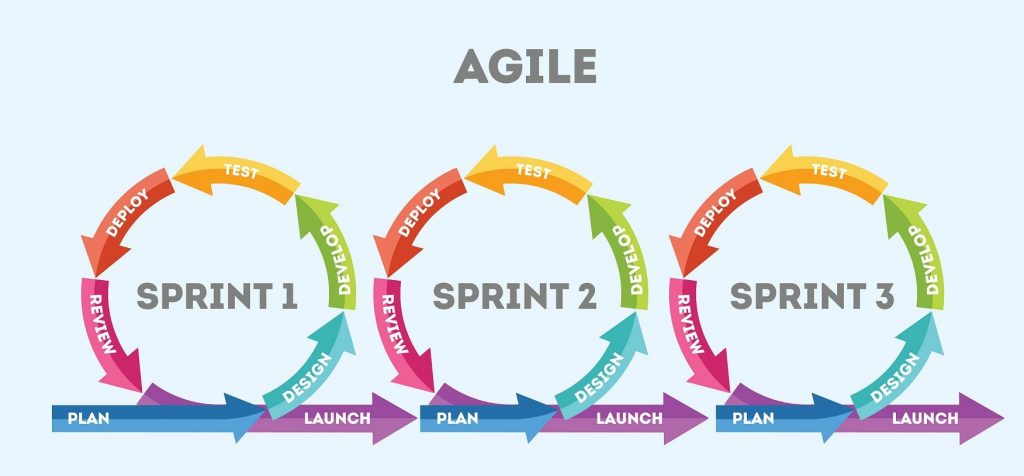
Agile methodologies have revolutionized project management in web development. Here’s a brief overview:
Scrum
- Structure: Emphasizes short, iterative cycles known as sprints
- Advantages: Enables rapid adaptation to changes and continuous feedback
- Goal: Keeps the team aligned and progressing towards project objectives
Kanban
- Structure: Uses visual workflows with boards and cards for task tracking
- Advantages: Provides real-time updates, enhances collaboration, and improves resource allocation
- Goal: Monitors progress and quickly identifies bottlenecks
Key Benefits of Agile
- Adaptability: Highly responsive to evolving project requirements
- Efficiency: Prioritizes delivering valuable features early
- Continuous Feedback: Boosts quality and team morale through regular feedback loops
By adopting Agile methodologies such as Scrum or Kanban, your team can streamline workflows, respond promptly to changes, and maintain transparent communication throughout the project lifecycle.
6. Choosing the Right Tool for Your Team
When evaluating project management tools for web development, consider these key criteria:
Ease of Use
Intuitive interfaces are crucial. Teamwork.com and monday.com are known for their ease of use.
Integration Capabilities
Seamless integration with other tools is essential. monday.com excels in data integration.
Customizability
Tools should fit specific project needs. Both Teamwork.com and monday.com offer customizable templates and dashboards.
Pricing
Consider your budget. Both Teamwork.com and monday.com offer tiered pricing based on service levels.
User Reviews and Ratings
Check platforms like G2 or Capterra for feedback to gauge user satisfaction and identify potential issues.
Guidance for Different Team Sizes and Projects
- Small Teams: Trello or Asana offer simple, cost-effective solutions.
- Medium to Large Teams: Teamwork.com or monday.com provide advanced features for complex projects.
- Highly Specialized Projects: JIRA is ideal for agile and custom workflows.
Sure! Here is the comparison table for the popular project management tools based on the mentioned criteria:
| Tool | Ease of Use | Integration Capabilities | Customizability | Pricing | User Reviews and Ratings | Suitable Team Sizes and Project Types |
|---|---|---|---|---|---|---|
| Asana | Very Easy | High | Moderate | Free to Premium | 4.5/5 | Small to Large Teams, Various Projects |
| Trello | Very Easy | Moderate | Low | Free to Business Class | 4.4/5 | Freelancers, Small to Medium Teams |
| monday.com | Easy | High | High | Basic to Enterprise | 4.6/5 | All Team Sizes, Complex Projects |
| ClickUp | Moderate | High | Very High | Free to Enterprise | 4.7/5 | All Team Sizes, Comprehensive Projects |
| Notion | Moderate | Moderate | Very High | Free to Enterprise | 4.5/5 | Small to Medium Teams, Creative Projects |
| Airtable | Easy | High | High | Free to Pro | 4.6/5 | Small to Large Teams, Data-intensive Projects |
| Teamwork.com | Moderate | High | Very High | Free to Enterprise | 4.4/5 | Medium to Large Teams, Multiple Complex Projects |
This table provides a quick overview to help you compare these project management tools based on critical criteria.
Ultimately, the right tool should align with your team’s workflow, project requirements, and budget, ensuring an efficient and productive development process.
7. Best Practices for Streamlining Web Development Projects
Here are some practical tips for using project management tools effectively:
Key Practices for Effective Use:
- Set Clear Goals and Milestones: Define project goals and establish specific milestones to visualize timelines and track progress.

- Break Down Tasks: Divide projects into smaller, manageable tasks to monitor progress and assign work easily.
- Assign Responsibilities: Assign tasks to specific team members to promote accountability.
- Update Progress Regularly: Frequently update task statuses to keep everyone informed and identify potential roadblocks early.
- Encourage Open Communication: Use communication features like chat or comments to facilitate discussions and share updates.
Advanced Practices:
- Utilize Dashboards and Reports: Implement dashboards and reports for an overview of project health and data-driven decision-making.
- Integrate with Other Tools: Connect your project management tool with other software to ensure a cohesive workflow.
- Customize Workflows: Tailor the tool to fit your team’s workflow by customizing statuses, fields, and notifications.
- Provide Training and Support: Ensure team members are trained and supported to maximize the tool’s features.
Remember, effective project management combines choosing the right tools with using them to complement your team’s workflow and communication style.
8. Enhancing Team Communication
Improving team communication in web development projects is essential for project success. Communication is the lifeblood of effective project management. It keeps everyone aligned, ensures tasks are correctly assigned, and identifies issues early.
Here’s how to enhance your team’s communication:
Verbal Communication
- Face-to-face and video calls for instant feedback and clarification.
- Regular stand-up meetings or check-ins to share updates and concerns.
- Tip: Encourage active listening to ensure all team members feel heard.

Nonverbal Communication
- Focus on body language, facial expressions, and tone of voice.
- Promote camera use during virtual meetings to build trust.
Written Communication
- Use clear and concise writing to minimize misunderstandings.
- Tools: Slack for real-time chats, Confluence for documentation.
- Tip: Set guidelines for response times and preferred communication channels.
By focusing on these strategies, improving team communication in web development projects can help your team remain connected, engaged, and productive, regardless of location.
9. In Conclusion
Successfully managing web development projects requires the right blend of tools and methodologies. By prioritizing planning, organization, task tracking, and effective communication, you can streamline your projects significantly.
Choosing the right project management tool depends on your team’s specific needs, the complexity of the project, and your budget. Keep your team’s workflow and preferences in mind to ensure the selected tool enhances productivity rather than complicates it.
Remember, no matter which tool or methodology you choose, the ultimate goal is to deliver a high-quality final product. Keep your efforts focused, adapt to changes efficiently, and maintain clear communication to ensure the success of your web development projects.