


Payload does not have a price. That is not the same as being free.
The software is open source and MIT licensed, so there is no licence fee, no per-editor seat, and no feature paywall that unlocks SSO at the enterprise tier. But every project still runs on infrastructure someone pays for and someone operates. Since Payload paused new Cloud deployments following its acquisition by Figma, there is no longer a default answer to hand a client, which is why Payload CMS hosting has become a planning question rather than a plan selection.
Existing Cloud projects keep running and the open source project continues under Figma backing, but a team starting today makes its own Payload CMS hosting decisions from scratch. That is a real shift. The question is no longer which plan to buy. It is what you are building, and who is going to run it at 3am.
Two things worth saying up front. First, all figures here are list prices at the time of writing, and providers reprice, sometimes sharply. Hetzner adjusted its cloud and dedicated server pricing upward in June 2026 across Germany, Finland, the US and Singapore, which reset a lot of mental maths overnight. Re-check before you commit.
Second, and more useful: the shape of the bill is stable even when the numbers are not. Learn the shape and you can re-run a Payload CMS hosting estimate in ten minutes whenever prices move.
Payload CMS hosting infrastructure components

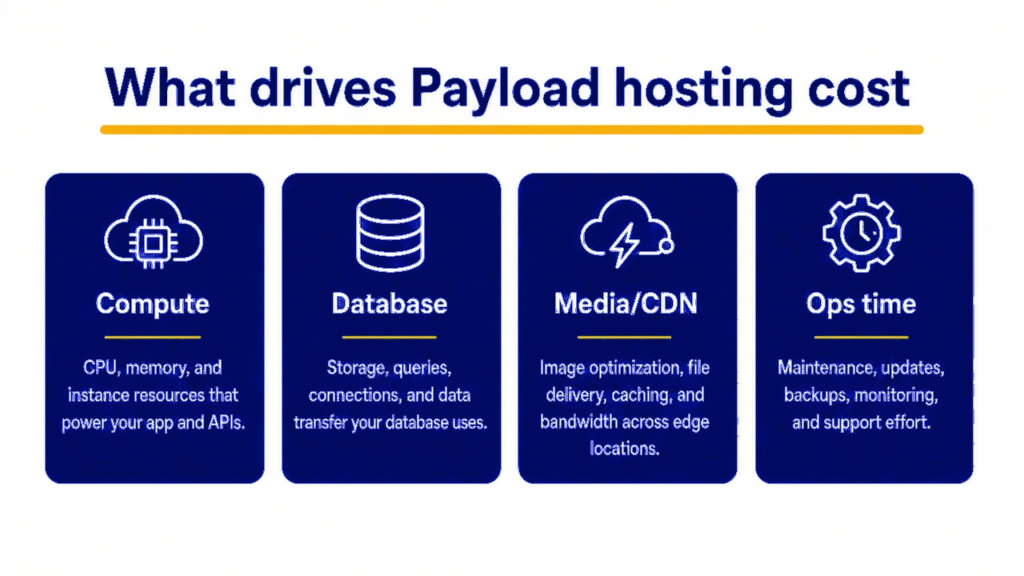
Payload own production deployment documentation is blunt about this. Payload runs fully inside Next.js, so it deploys anywhere Next.js runs, but most projects will also need a database, file storage, an email provider, and a CDN.
That is the honest Payload CMS hosting component list, and it is longer than most budgets assume. Five moving parts.
1. The application. Payload 3 is not a separate service sitting beside your site. The admin panel, the REST and GraphQL APIs, and your frontend are all one Next.js application: one build, one deployment. That is the single biggest thing to internalise about Payload CMS hosting. You are not hosting a CMS and a website. You are hosting one Node application that contains both.
2. The database. Postgres or MongoDB. Payload works with any Postgres, and with MongoDB-compatible databases including AWS DocumentDB. Azure Cosmos DB is supported with a compatibility preset, though the docs note its Mongo API is not fully compatible and some core features may not behave reliably. There is no production-grade file-based option, so a real database has to exist before the CMS does anything at all. This is the line teams most often forget to budget.
3. File storage. If editors upload anything, and they will, those files need somewhere permanent to live. More on why this is a trap rather than a line item below.
4. Email. Password resets, admin invitations, form notifications. A transactional email provider is usually free to a few thousand messages a month, then a few dollars. Small, but it is the piece people discover missing on launch day when nobody can reset a password.
5. A CDN. For media and static assets. Often bundled with your host or your storage provider, occasionally its own bill.
And a sixth component that never appears on a pricing page: someone who operates all of it. Node version upgrades, dependency patches, database migrations that run on deploy, an expiring TLS certificate, a rotated secret, a storage bucket approaching its quota. This is the cost line that turns a cheap stack expensive, and it is the one nobody puts in the spreadsheet.
Payload CMS hosting options and monthly cost

Before comparing providers, there is one architectural fork in every Payload CMS hosting decision that decides more about your bill and your failure modes than the provider name does: always-on server, or serverless.
Payload was designed as a persistent Node application. Its admin panel and API routes execute server-side on every request. Serverless platforms run it perfectly well, and Payload publishes both Vercel templates and a Cloudflare Workers guide, but serverless changes the shape of your problems.
Cold starts show up as a sluggish admin panel for the editor who logs in first thing Monday. Database connection pools get exhausted when many short-lived functions each open their own connection. Long operations, such as a large media upload, a heavy migration, or a bulk publish, bump into function timeouts that a persistent server would never notice.
None of that is disqualifying. It is the trade. Serverless gives you scale-to-zero economics and no server to patch, and hands you constraints around persistence, connections, and time limits. An always-on container or VPS gives you predictable behaviour and a machine you fully control, and hands you a machine you now have to look after.
With that fork in mind, here are the realistic Payload CMS hosting options.
| Option | Roughly what it costs | What you are actually buying |
|---|---|---|
| Vercel Pro | From $20 per month per developer seat, each seat carrying $20 of usage credit. Overages are dominated by data transfer and edge requests | Fastest possible setup, zero servers to maintain. The bill scales with traffic and can move fast if a campaign lands. Serverless constraints apply |
| Railway, Render or Fly.io | Base plan around $5 to $20 per month plus metered usage | Managed containers. Always-on behaviour without running a VPS yourself. A comfortable middle ground for most agencies and product teams |
| VPS with Docker (Hetzner, DigitalOcean Droplet, Vultr) | From roughly 5 to 6 euro per month in Europe for a small instance. US pricing moved up in mid 2026, so check current rates | Total control, cheapest at steady load, fully predictable bill. You own patching, monitoring and restarts |
| Cloudflare Workers | Around $5 to $10 per month | Cheapest and globally distributed, with platform-specific constraints you should validate against your project before committing |
Then the database, which is a separate bill.
- Managed serverless Postgres, for example Neon: billed by compute-hour rather than by instance, at roughly $0.106 per compute-unit-hour on its entry paid tier with storage around $0.35 per GB-month, plus a free tier suitable for staging. Cheap for spiky, low-traffic content sites and less predictable under constant load.
- Managed Postgres or MongoDB on a fixed plan: typically $15 to $60 per month for something you would put a client on, with backups included.
- Postgres in a container on your own VPS: effectively free in cash terms, and entirely yours to back up, monitor and restore. That last word is the expensive one.
Railway publishes a step-by-step Payload and Postgres guide that is a useful reality check on how many moving parts a managed-container deployment actually involves.
Scaling and media storage in Payload CMS hosting
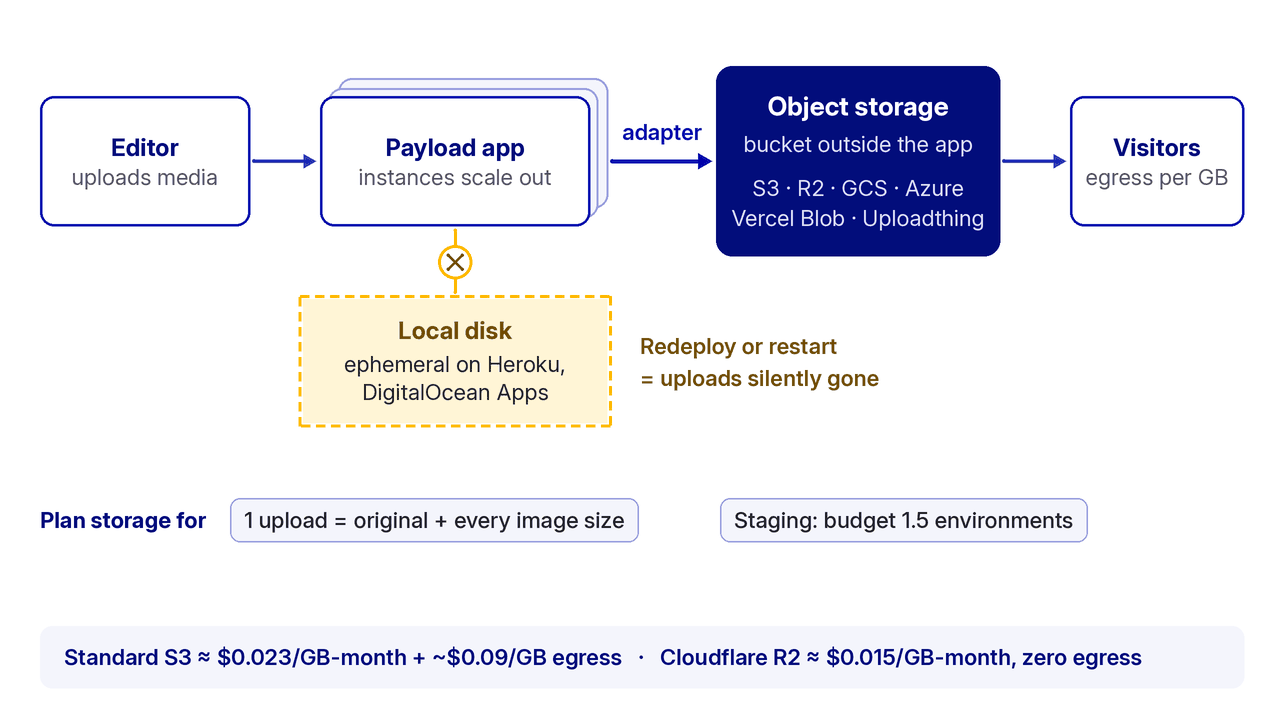
Media is where Payload CMS hosting quietly goes wrong, and the official docs flag exactly why.
Some hosts give your application an ephemeral filesystem, meaning anything written to local disk disappears on restart or redeploy. Payload documentation names Heroku and DigitalOcean Apps as examples, against persistent-filesystem hosts like DigitalOcean Droplets and Amazon EC2.
On an ephemeral host with local uploads, everything works beautifully in testing, and then a routine redeploy silently deletes every image an editor has uploaded since launch. There is no error. The files are simply gone.
The fix is object storage: a bucket that lives outside your application. Payload ships official adapters for AWS S3, Google Cloud Storage, Azure Blob Storage, Vercel Blob and Uploadthing. Configure one before launch, not after the first incident. Local disk is a development convenience. In production it is a countdown.
The economics of the bucket are worth understanding, because storage is rarely the expensive part. Moving the files is. Standard S3 sits around $0.023 per GB per month with egress billed per gigabyte, roughly $0.09 per GB from some regions. Cloudflare R2 charges around $0.015 per GB per month with zero egress fees, which is why image-heavy sites often see their storage bill fall by most of its value simply by changing providers.
For a marketing site with a few gigabytes of media, the difference is a rounding error. For a catalogue with thousands of product images served to a growing audience, egress is frequently the largest single line on the invoice.
Two multipliers to plan for. First, image variants: Payload generates resized versions of uploads, so one 4MB hero image is not 4MB of storage. It is the original plus every size you defined. Ten product photos at five sizes each is fifty objects.
Second, staging environments: a full staging copy duplicates the app, the database, and often the media. Budget for one and a half environments, not one.
Backups and monitoring in a Payload CMS hosting setup

This is the section that separates a site that has been deployed from one that is genuinely in production, and it is the part of Payload CMS hosting that never shows up on a pricing page.
Database backups, automated and tested. Managed database providers usually include automated backups. A self-hosted Postgres does not, until you set it up. Either way, the number that matters is not whether backups exist. It is when someone last restored one into a scratch environment and confirmed the result was usable. An untested backup is a belief, not a safeguard.
Media backups. Object storage is durable, but durability protects against hardware failure, not against a bad script or a deleted bucket. Versioning or a lifecycle rule costs almost nothing and is worth having.
Uptime and error monitoring. Something that notices the site is down before a client does, and something that captures server-side errors with enough context to act on. Free tiers cover a single small project comfortably. A handful of dollars a month covers a real one.
Resource alerts. Disk usage, database connections and storage quota. These fail slowly and then all at once, and they are trivial to alert on in advance.
Security hygiene from the Payload checklist. A long, unguessable PAYLOAD_SECRET. Access-control rules reviewed rather than assumed, since by default every operation requires an authenticated user and it is your configuration that decides who counts. Secure cookies behind TLS. And the built-in abuse protections, including login lockouts, GraphQL query complexity limits and depth limits, left switched on.
Call it $0 to $30 per month in tooling for most projects. The genuine cost here is one person’s attention, monthly, forever.
Payload CMS hosting cost bands
Estimates, not quotes, but structured the way a real budget line should be, with the operations cost visible instead of hidden.
| Band | What it looks like | Infrastructure per month | What else to budget |
|---|---|---|---|
| 1. Marketing or small content site | One environment plus light staging, modest media, traffic in the low tens of thousands of visits | $25 to $60 | Small container or VPS, small managed database or a compact Neon plan, object storage in single-digit dollars, free-tier email and monitoring, plus a few hours a month of someone’s time for patching and checks |
| 2. Business site or content-driven commerce frontend | Real staging environment, several editors, meaningful media library, steady traffic | $80 to $250 | Always-on hosting with headroom, a managed database on a fixed plan with backups, object storage plus CDN, paid monitoring, and a standing maintenance allocation |
| 3. Multi-market, media-heavy or high traffic | Multiple locales, large image library, campaign spikes, possibly multiple environments and a separate commerce backend | $300 and up | Egress rather than compute is the variable. Storage and CDN choice affects the bill more than the application host, and capacity planning becomes recurring rather than a launch task |
Across all three bands, the same pattern holds: infrastructure is the small number and operations is the large one. A $40 per month stack that consumes two hours of senior engineering attention a month is not a $40 per month stack. Budgets that only capture the invoice are the ones that get revised angrily in month six.
If your build pairs Payload with a separate commerce engine, the same logic applies twice over: see our write-up on running content and commerce together for where that boundary should sit.
Questions worth answering before choosing
These are the questions that tend to determine the outcome, and every one of them is a business question wearing technical clothes.
- Always-on or serverless? Decide it deliberately, based on how editors use the admin panel and how heavy your media operations are, not by defaulting to whatever deploys fastest.
- Where do uploaded files live on day one? If the answer is the server’s disk, that is a decision with an expiry date.
- Who restores the database, and have they done it once? Before launch, not during an incident.
- What happens when traffic multiplies for a week? Some bills scale linearly, some cliff-edge. Knowing which shape you are on is worth ten minutes.
- Whose name is on the infrastructure accounts? Whoever holds the AWS, Vercel or database account holds the exit. If an agency resells hosting rather than setting it up in your own accounts, changing partners later means migrating rather than handing over a password.
- Who owns this in twelve months? The infrastructure will outlive the build. Every operations decision should name a person, not a team.
Answer those and the Payload CMS hosting choice mostly resolves itself. The providers change, the prices move, and the questions stay the same.
We build Payload projects and set up the infrastructure around them: database, storage, backups, monitoring and the deployment pipeline. We then operate it under a maintenance agreement where that is what a team needs. The infrastructure itself runs on third-party providers, in accounts held in your name, so you own the platform your content sits on and the bill comes from the provider rather than through us.
If you are planning a build and want the Payload CMS hosting cost and the operational ownership settled before the first sprint rather than after launch, discuss a hosting plan with us. We are also glad to look at the wider CMS setup if you are still choosing.
Frequently asked questions
Is Payload CMS free to host?
The software is free and MIT licensed, with no licence fee and no per-editor seat. Payload CMS hosting is not free, because the application, a database, object storage, an email provider and a CDN all run on infrastructure someone pays for. Expect roughly $25 to $60 per month for a small content site, before anyone operates it.
How much does Payload CMS hosting cost per month?
Payload CMS hosting falls into three realistic bands: about $25 to $60 for a marketing site, $80 to $250 for a business site with real staging and several editors, and $300 and up for multi-market or media-heavy projects. At the top band the variable is usually egress rather than compute, so storage and CDN choices matter more than the application host.
Can I self host Payload CMS?
Yes. Payload runs fully inside Next.js, so it deploys anywhere Next.js runs, including a VPS with Docker from roughly 5 to 6 euro per month in Europe. Self hosting is the cheapest Payload CMS hosting option at steady load and gives a fully predictable bill, but you own patching, monitoring, backups and restarts.
Do I need object storage, or can uploads sit on the server disk?
If your host has an ephemeral filesystem, local uploads are deleted on the next restart or redeploy, silently and without an error. Payload ships adapters for AWS S3, Google Cloud Storage, Azure Blob Storage, Vercel Blob and Uploadthing. Configure one before launch rather than after the first incident.
Is serverless or an always-on server better for Payload?
Serverless gives you scale-to-zero economics and no server to patch, at the cost of cold starts in the admin panel, connection-pool pressure and function timeouts on long operations. An always-on container or VPS gives predictable behaviour and full control, at the cost of a machine you have to look after. Decide by how editors use the admin panel and how heavy your media operations are.
What happened to Payload Cloud?
Payload paused new Cloud deployments following the Figma acquisition. Existing Cloud projects keep running and the open source project continues under Figma backing, but a team starting today makes its own Payload CMS hosting decisions rather than picking a first-party plan.