


Every Medusa build reaches the same moment. The catalogue is loaded, checkout works, the first orders are coming through, and then someone from marketing asks where the buying guide goes. Or the size chart. Or the campaign page that needs to go live Thursday morning with three products embedded in it.
The answer a team gives in that moment tends to become their architecture for the next two years. Most teams answer it in the smallest possible way: they add one more field. That is the decision worth slowing down for, and it is the reason a Payload CMS Medusa pairing comes up so often in headless ecommerce planning.
The real question is not which CMS to use. That one gets settled quickly once the harder question is answered. The harder question is where the line sits between content and commerce, and who owns each side of it. Get that right and the tooling follows. Get it wrong and no CMS will save you, because you will be running two systems that both think they are in charge of the same product.
Why commerce needs a separate CMS

Medusa is deliberately not a content tool. Its admin is built around SKUs, pricing rules, inventory, fulfilment, and order state: structured commerce data with tight schemas and strong opinions. That focus is why it is good at what it does.
What it means in practice is that Medusa has no natural home for a 900 word product story, a photo gallery, an embedded video, a comparison table, or a landing page that is not a product at all. When a system has no natural home for something a business genuinely needs, that thing does not disappear. It gets stuffed somewhere it does not belong.
Two failure patterns show up again and again in teams that have not yet considered a Payload CMS Medusa split. Both are worth recognising early, because both look completely reasonable on the day they start.
The homemade CMS. It begins with one metadata field on the product for the long description. Then a second for the hero image URL. Then a third for the care instructions, a fourth for the campaign banner, a fifth for the FAQ block.
Six months later the commerce engine is quietly holding the company marketing content in a pile of untyped key value fields, with no rich text editor, no image library, no draft state, no version history, no preview, and no way for a content editor to touch any of it without a developer. Nobody chose this. It accumulated. Unwinding it later means a migration nobody has budget for.
The mirror. The opposite move: bring a CMS in, then copy product data into it so editors can see the product while they write. Now price lives in two places. So does stock, the product title, and the variant list.
The two copies agree perfectly on day one and start drifting by week three, because someone updates a price in the commerce admin and the content system never hears about it. The failure mode is a page showing a price the checkout does not honour, which is not a content problem any more. It is a trust problem with a customer watching.
Notice what these two have in common. Neither is really a tooling failure. Both are what happens when nobody decided, explicitly and in writing, which system owns which field. That single decision is most of what a Payload CMS Medusa architecture actually is, and the rest is implementation detail.
Where the boundary sits in a Payload CMS Medusa setup
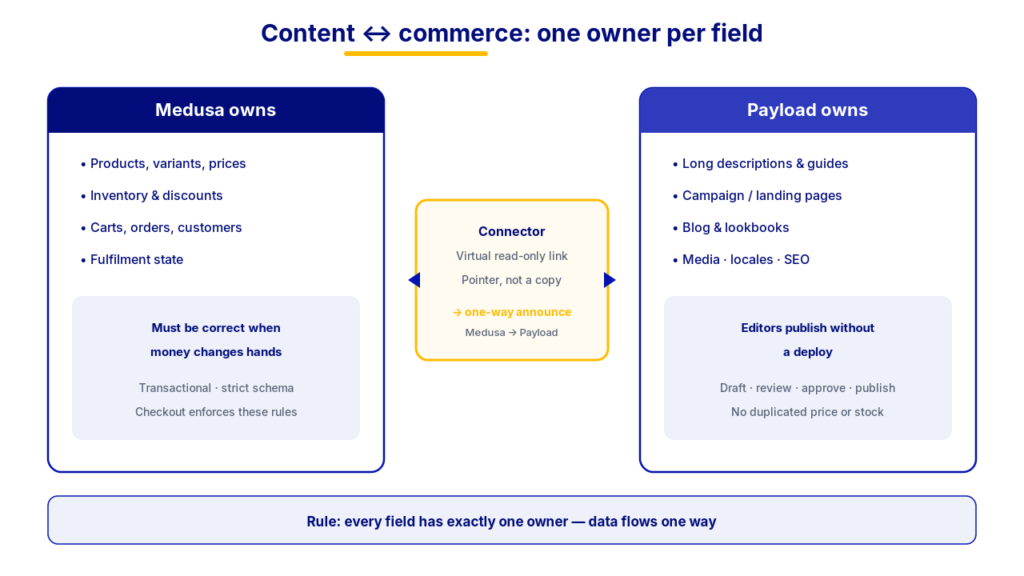
The rule that prevents both failures is short enough to put on a whiteboard: every field has exactly one owner, and data flows one way.
If Medusa owns price, the CMS never stores price. It reads it at render time or does not show it. If the CMS owns the editorial description, Medusa never stores a second version of it just for the admin. No field is jointly owned, and no sync runs in both directions. Two-way sync sounds like flexibility and behaves like a conflict-resolution problem you will be debugging at 11pm during a sale.
Applied to a Payload CMS Medusa architecture, the split lands roughly here.
| Data or content type | Owner | Why it sits there |
|---|---|---|
| Products, variants, prices, currencies | Medusa | It has to be correct at the moment money changes hands |
| Inventory, options, discounts | Medusa | Commercial rules the checkout actually enforces |
| Carts, orders, customers, fulfilment | Medusa | Transactional state with a strict schema |
| Long descriptions, buying guides, lookbooks | Payload | Editorial work a marketer should change without a deploy |
| Campaign pages, landing pages, blog content | Payload | Not products at all, so no product record should hold them |
| Media library, translated copy, page level SEO | Payload | Content shaped workflows: draft, review, approve, publish |
| Product name, product images, product page SEO | Grey zone | Decide once, using the tiebreaker below, and write it down |
The grey zone is where most Payload CMS Medusa arguments actually happen. There is no universally right answer, but there is a reliable tiebreaker: whoever gets blamed when it is wrong should own it.
If the merchandising team is accountable for product naming and it needs to match invoices and packing slips, it belongs in Medusa. If the brand team owns how the product is presented and the storefront name is a marketing decision, it belongs in Payload. What matters far more than which way you decide is that you decide once, write it down, and stop having the argument.
How the official Payload CMS Medusa integration works
Medusa published an official Payload integration tutorial in August 2025, and it is worth understanding what it actually does, because the mechanism is the part that keeps the boundary honest. A Payload CMS Medusa integration is not a plugin you install and forget. It is a modest amount of custom code with three moving parts.
A connector. In Medusa terms, a custom module: a small service that knows how to create, update, fetch, and delete records in Payload through the Payload API, authenticated with an API key. You register it in the Medusa config the same way you would register a payment or shipping integration. This is the piece that lets Medusa talk to Payload at all.
A pointer, not a copy. This is the important one. Medusa supports a virtual read-only link between one of its own models and a record in an outside system. The link connects a Payload content record to a Medusa product without copying either into the database of the other.
Your storefront can then ask Medusa for a product and its linked Payload content in a single request and get one combined response back. No duplicated fields means nothing to drift, which is the mirror failure designed out at the architecture level rather than patched with a nightly sync job.
Announcements and listeners. Medusa emits events when things happen: a product is created, an option is added. The integration attaches small listeners, which Medusa calls subscribers, that hear those events and run a workflow to create or update the matching content record in Payload.
When a merchandiser adds a product in the commerce admin, its content shell appears in the CMS on its own, waiting for an editor. Nobody has to remember to create it. The direction is deliberate and worth naming: Medusa announces, Payload receives. Product existence flows one way, editorial content never flows back into the commerce engine, and that single constraint is what keeps a Payload CMS Medusa integration from turning into two systems arguing.
Modelling Payload CMS Medusa content against products
With the boundary set, the modelling work in a Payload CMS Medusa project becomes concrete.
The join key. Every Payload content record that describes a product carries the Medusa product ID. That is the whole relationship. It is boring, and boring is the point: one shared identifier, owned by the commerce side, never regenerated. In a Payload CMS Medusa model, everything else hangs off that single ID.
Two shapes of content, not one. It helps to separate content that hangs off a product from content that stands alone. Product attached content, such as a long description, gallery, spec table, or care guide, is created and kept in step by the sync.
Standalone content, such as campaign pages, editorial articles, category landing pages, and a help centre, lives entirely in Payload and references products by ID where it wants to feature them. Teams that model only the first kind end up back in the commerce admin building landing pages out of product fields, which is the homemade CMS with extra steps.
Extending past products. Categories, collections, and custom content types follow the same pattern: define the link, add the corresponding methods on the connector, and the join keeps working. This is the practical payoff of doing the first one properly. The second and third are the same shape rather than new inventions.
Localisation. If you sell across markets, this is a strong argument for the split on its own. Translated marketing copy is a content problem with content shaped workflows: draft, review, approve, publish, per locale. Payload handles localisation natively. Trying to run the same workflow inside the product fields of a commerce engine is where multi-market teams lose weeks, and it is often the reason a Payload CMS Medusa build gets approved in the first place.
Preview and publishing in a Payload CMS Medusa stack

Splitting content and commerce raises a question a single system never had to answer: how does an editor see the real page before the world does?
In a headless setup, the storefront is a separate application, so the CMS cannot render the page itself. The standard answer is a draft mode in the storefront. An editor working in Payload clicks preview, the storefront receives a signal, typically a preview cookie, telling it to fetch unpublished content for that one visitor, and renders the page exactly as it will look. Every other visitor continues to see the published version.
That pattern is well-trodden ground in Next.js and not specific to this pairing. What is specific is why it matters more here. In a single-system CMS, the person editing the page usually owns the whole page. In a split setup, the person editing the content generally does not own the catalogue, and the page they are previewing is assembled from both systems at render time.
Preview is where an editor finds out that their beautiful new product story sits above a variant selector with two options they were not expecting. That is a feature, not a nuisance, and it is worth putting in front of the content team early rather than the week of launch.
One trap worth planning for: content preview shows draft content against live commerce data. That is usually what you want. But it means a preview cannot tell you how the page will look when next month price or a not-yet-published variant lands.
If a campaign depends on both a content change and a commerce change going live together, that coordination has to be deliberate: a shared go-live checklist, or a staging environment carrying both. It is not something preview mode solves for you.
What a Payload CMS Medusa build actually costs

Being straight about the cost, because this is where planning usually goes wrong. The official Medusa tutorial covers building the connector module and its typed service, defining the virtual link, writing a workflow that turns Medusa product data into a Payload record, adding event listeners so new products and options sync automatically, and exposing a bulk sync route to backfill everything that already exists.
Individually, none of these steps is exotic. Together they are a real build for a developer already fluent in the Medusa module and workflow model, measured in days of focused work rather than an afternoon. Three costs teams routinely underestimate are worth pricing in before anyone commits to a launch date.
| Work item | What it involves | Why teams miss it |
|---|---|---|
| The backfill | A one-time bulk sync for the existing catalogue, built to be re-runnable | Automatic sync only catches products created after the integration goes live, and you will run the backfill more than once while the model settles |
| Model changes | Every new content field touches both the Payload collection and the sync that populates it | The first few feel fast, which hides the fact that content modelling is ongoing work here, not a setup task |
| Operations | Visibility into products that exist in Medusa without a content record in Payload, plus a way to re-run the sync for them | A sync is a system, not a script: deploys, rotated API keys, and malformed fields all break it quietly |
That last one deserves emphasis. Building sync visibility is a small job at the start and an expensive one to retrofit after a silent failure has been running for a month.
What you get from a Payload CMS Medusa split is worth stating plainly, because it is the reason the pattern keeps winning. Two systems that each stay simple. A content team that can publish without a deploy. A commerce team that can change prices without a content review. No duplicated data to drift. And a sync layer you own outright rather than a bundled CMS whose limits you will discover the week before a launch.
The ecosystem is moving in this direction rather than away from it. Payload was acquired by Figma in 2025, which puts serious backing behind the content half of a Payload CMS Medusa stack.
Questions worth answering before you build
If a team is weighing this pairing, these are the questions that tend to determine the outcome, and every one of them is a business question wearing technical clothes.
- Who publishes? If the only people who ever change content are developers, a split system adds process without adding speed. If marketing publishes weekly, the split pays for itself quickly.
- How much content is there, really? A hundred products with a paragraph each is a different problem from twenty products with a full editorial page, a video, and four translations each.
- How many markets? Localisation is the single strongest argument for a real CMS, and the cost of getting it wrong compounds per market.
- Who owns the grey zone fields? Product name, images, page SEO. Decide before the build, not during it.
- Who operates the sync at 2am? If nobody can answer this, the answer is that it does not get operated.
Answer those five and a Payload CMS Medusa architecture mostly designs itself. Leave them unanswered and you will be answering them anyway, one metadata field at a time. Teams arriving here from a hosted platform, often after they outgrow Shopify, tend to feel the difference within the first campaign.
We build on both Medusa.js and Payload CMS, and a Payload CMS Medusa decision is exactly the kind we prefer to work through with a team before the first line of code: where the boundary sits, who owns what, and what it will cost to run once it is live. If you are weighing whether to bring a separate CMS into a Medusa build, request an architecture review and we will look at what you are publishing and where the line should fall for your case.
Frequently asked questions
Do I need a separate CMS if I already use Medusa?
Not always. If developers are the only people who ever change content, the Medusa fields may be enough for a while. A Payload CMS Medusa split earns its keep once marketing publishes on its own schedule, once you sell in more than one language, or once product pages carry real editorial content rather than a single paragraph.
Does a Payload CMS Medusa integration duplicate product data?
No, and that is the point. The Medusa virtual read-only link connects a Payload record to a Medusa product by ID without copying prices, stock, or variants into the CMS. The storefront requests both in one call and assembles the page at render time, so there is nothing to drift.
Who should own the product name and product images?
Whoever gets blamed when they are wrong. If naming has to match invoices and packing slips, Medusa owns it. If the storefront name is a brand decision, Payload owns it. The decision matters less than writing it down once and holding to it.
How long does a Payload CMS Medusa build take?
For a developer already fluent in the Medusa module and workflow model, the connector, link, workflow, subscribers, and bulk sync route are days of focused work rather than an afternoon. Backfilling an existing catalogue and building operational visibility into the sync usually add more time than the integration itself.
Can editors preview a page before it goes live?
Yes, through draft mode in the storefront. Payload signals the storefront to fetch unpublished content for that one visitor while everyone else sees the published page. Preview renders draft content against live commerce data, so a coordinated content and price launch still needs a shared go-live checklist.