


A flash sale goes live on your online store and a partner marketplace at the same time. Both sales channels show ten units of “T-shirt – size M, black.” Two customers complete checkout within seconds of each other, each buying all ten. Without correct inventory management, you just promised twenty units you do not have. Medusa v2 prevents this by separating product definitions from physical stock and computing availability per channel from real-time inventory levels. This article explains exactly how those building blocks fit together, where they break, and what trade-offs you face when designing the system.
What does “inventory management” mean in a Medusa v2 store?
In Medusa v2, inventory management means tracking how many units of each inventory item physically exist at each stock location, reserving units when orders are placed, and computing availability per sales channel based on which locations feed that channel.
Medusa separates concerns across distinct Medusa modules. The product module holds product metadata: titles, product variants, options, tags, collections. The Inventory Module tracks inventory items, stock levels (stocked, reserved, incoming quantities) across multiple stock locations. The Sales Channel module attaches products and locations to specific storefronts or channels, so availability reflects actual stock. Modules in Medusa can be used independently or combined, which is what makes this separation practical rather than just architectural.
Medusa’s inventory tracking prevents overselling by reserving units at order placement, decreasing stocked quantity only at fulfilment, and computing available quantity as stocked_quantity − reserved_quantity for each inventory item in locations linked to the relevant sales channel. That keeps stock correct even when you operate across multiple locations or channels.
Here is how the pieces connect with a concrete example. The product “T-shirt” has a variant “Size M, Black.” When manage_inventory is enabled on that variant, Medusa associates it with an inventory item. That inventory item has an inventory level in each stock location, say five units in Warehouse A, three in Warehouse B. If your “Online” sales channel includes both warehouses, available quantity for that variant in that channel is eight minus whatever is reserved.
Inventory logic most often collides with marketing plans: flash sales and bundled promotions where product variants with different options need distinct inventory levels, and failing to model that correctly causes stock to disappear for one size while another never sells.
How does the Product Module affect inventory in Medusa?
Inventory tracks quantities at the inventory item and stock location level. The product module defines what can be bought. These are separate concerns, but the mapping between them determines whether your stock numbers mean anything.
The Product Module manages product information and variants, including the structures that matter for stock:
- Products are container entities. They hold metadata, title, description, media, but not quantities.
- Options (e.g. Size, Colour) define the dimensions along which variants exist.
- Product variants are the sellable units. A variant like “T-shirt / Size: M / Colour: Black” is what a customer actually buys. Variants carry manage_inventory and allow_backorder flags. When manage_inventory is true, Medusa links the variant to an inventory item and tracks quantities.
- Categories, collections, and tags are grouping constructs. You can utilize categories for filtering and organisation, for example, a “Summer 2026” collection helps with seasonal buffer stock planning, but they do not store quantities themselves. They influence product listings and product catalog structure, not availability logic.
Each product variant (when inventory-managed) links to one or more inventory items. That inventory item then holds inventory levels at each stock location. If you have two warehouses, a single variant’s inventory item might have stocked_quantity entries in both; total availability sums those levels if the sales channel covers both locations.
SKU conventions and metadata fields on both variants and inventory items, including external IDs, are how you map to external systems. Medusa’s bulk import templates include fields like “Variant SKU” and “Variant Metadata,” so aligning these with ERP or WMS identifiers early avoids painful remapping later.
There is a real engineering trade-off here. When inventory differs by configuration (colour, size), using many discrete variants, each with its own inventory item, gives clear per-variant stock visibility. But too many variants increases import complexity, admin UI overhead, and potentially query times for large product catalogs. Collapsing options to reduce variant count saves overhead but loses the ability to manage products at the granularity your warehouse actually tracks.
Comparing Medusa’s inventory building blocks
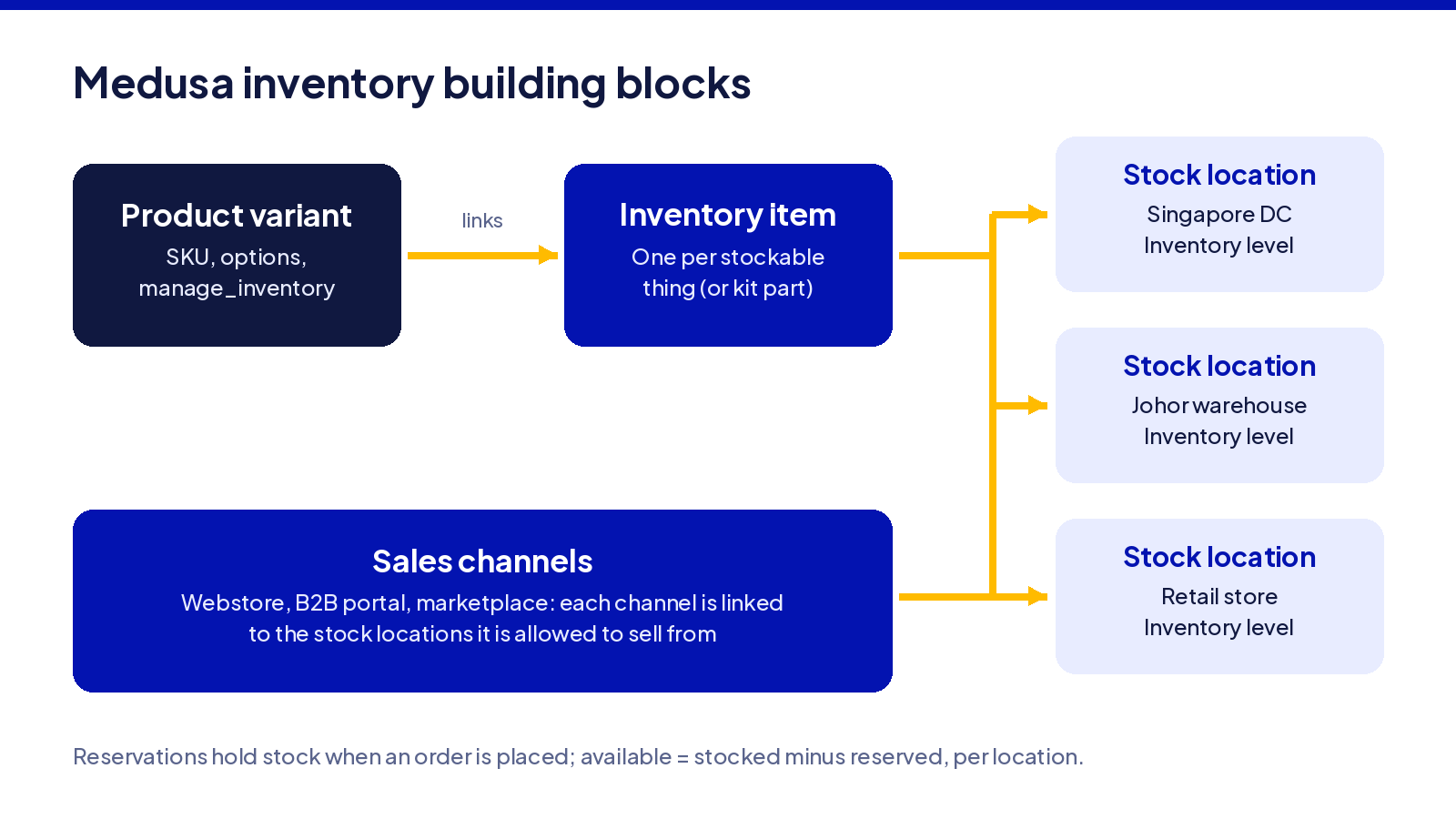
Medusa’s inventory behaviour comes from combining several modules: Inventory, Stock Location, Sales Channel, Pricing, and reservation flows. None of these works alone. A tech lead planning a new store needs to understand what each concept does well, where it breaks, and what you give up by relying on it.
Core Medusa inventory concepts side by side
| Concept | What it is good at | Where it breaks | What you give up |
|---|---|---|---|
| Product Variant vs Inventory Item | Variants define the sellable item with options and metadata; inventory items carry stock and can be shared across variants (e.g. bundles, kits). Clean one-to-one mapping gives maximum visibility. | If a variant is created but not linked properly to its inventory item, common during bulk imports, stock tracking silently fails. Shared inventory items complicate returns and forecasting. | Sharing inventory across variants reduces per-variant clarity. One-to-one mapping is cleaner but may duplicate inventory item definitions. |
| Stock Location | Supports multiple stock locations, e.g. “Ho Chi Minh warehouse” vs “Singapore retail shop.” Allows routing fulfilment, returns, and channel availability per customer location. | A new location added but not linked to the right sales channels means inventory sits unused or availability is miscomputed. Medusa.js tracks inventory levels across multiple locations, but only if the mappings are correct. | Many locations increase complexity: more inventory level rows, more sync events, more routing logic. Fewer locations simplifies operations but reduces fulfilment flexibility. |
| Sales Channel | Scopes product visibility and availability per channel. A marketplace channel can use only certain warehouse locations or product subsets, enabling businesses to control what each channel sells. | Products available in a channel but with stock locations not linked to that channel show zero availability even when stock exists. Misconfigured default sales channels expose wrong inventory. | Adding many channels increases the need for consistent mapping and testing. You give up simplicity in availability computation. |
| Reservations | Prevents overselling by reserving stock at order placement; stock only decremented on fulfilment. Medusa.js supports reserving stock for orders, which handles concurrency, pre-orders, and holds. | Observed failure: a “reservation deadlock” where reserved_quantity equals stocked_quantity blocks even fulfilment of that same order. Stale reservations on cancelled orders can block availability. | Reservation management adds complexity: cleanup for cancellations, abandoned carts, and performance considerations when many open carts exist simultaneously. |
| Price Lists and Pricing Regions | Supports regional or B2B pricing strategies per channel, matching inventory availability scope. Example: EU-region pricing only showing when EU warehouses have stock. | Price list regions misaligned with stock location regions can show prices for items that are out of stock, or display wrong currencies. Campaign price lists may clash with availability logic. | Many price lists increase code, test, and maintenance burden; coarse pricing is simpler but less flexible. |
The key features of this system are its modularity and the data models that connect modules, but the connections themselves are where most production bugs live.
Where Medusa inventory management typically fails in production

Most issues surface only after real orders, partial returns, and multiple channels are active, not during initial setup or demo testing. Below are failure modes specific to Medusa v2 behaviour, not generic e-commerce theory.
Common failure modes and why they happen
- Misaligned variants and inventory items. A variant is created but manage_inventory is off, or the inventory item linking is incorrect (often via import). Some sizes or colours never decrement stock; others vanish from availability. Teams discover this when a variant sells out but the storefront still shows it in stock, or vice versa. This is the most common reason inventory tracking diverges from reality.
- Forgotten stock locations. A new warehouse or retail outlet is added as a stock location but never linked to affected sales channels. Availability queries for a channel do not include stock from that location, making it appear there is nothing to sell, even though physical stock exists. Discovered when a local store order cannot be fulfilled despite the warehouse having quantity on hand.
- Reservation leaks. Abandoned carts, failed payments, or draft orders that never get cleaned up leave reservation items in place. Since available quantity equals stocked minus reserved, those reservations permanently reduce what customers can buy. Teams notice when attempts to fulfil orders are blocked, but a manual inventory count shows stock is present.
- Overselling during campaigns. High concurrency during flash sales causes multiple checkouts simultaneously around the last units. If availability is checked but reservations or order flows lag, more customers than stock can complete purchase. Medusa.js allows real-time inventory level checks, but the check must happen at the right point in the checkout workflow, not at marketing click events.
- Partial returns and exchanges. When returns are processed, if returned items are not linked to the correct stock location or not flagged as “received,” stocked_quantity does not increment. Or worse, reserved_quantity stays inflated. This misreports available_quantity, and the error compounds over time across multiple products.
- ERP sync delays. External systems (ERP, WMS) that sync inventory via polling can create brief windows where available stock in the Medusa application is wrong. This becomes visible when stock adjustments, physical counts, external sales, are not reflected in Medusa before a customer begins checkout.
A typical example: during a promotion where bundled products share inventory items and there is no per-bundle reservation logic, stock depletes early and one size oversells, often caught only when order fulfilment fails the next morning.
The trade-offs when you design inventory in Medusa
Medusa gives you low-level primitives, not a pre-built answer. Decisions about where the source of truth lives, how granular your variant and inventory item design is, and how real-time your checks need to be all carry technical and operational trade-offs. The framework provides full control, but that control requires deliberate architecture.
Where is the source of truth: Medusa vs ERP vs WMS?
- Medusa as source of truth. All stock is managed inside Medusa: fulfilments, returns, stock adjustments. Benefit: simpler flows, availability always reflects what Medusa knows. Limitation: warehouse or physical processes may deviate from what the system records, and this model demands correct integrations with external tools for anything outside the commerce system.
- ERP or WMS as source of truth. Medusa mirrors stock from the external system. The platform offers APIs to integrate with external ERP or WMS systems, but this introduces latency and possible race conditions: an external update arriving just after a customer begins checkout can cause a reservation against stock that no longer exists. Medusa’s modular architecture allows easy integration of custom tools, but “easy” here means structurally possible, not free of complexity.
- Hybrid setups. Medusa holds “e-commerce-available stock” while ERP tracks full physical stock including in-transit and stock reserved by other channels. This is common but changes how reservations work: Medusa may reserve only from the e-commerce-available portion. You can connect Medusa.js with third-party systems using APIs, but the mapping between Medusa’s stocked_quantity, reserved_quantity, and incoming_quantity and ERP equivalents (on hand, allocated, on order) must be explicit.
- Race conditions. When an external system reduces stock while Medusa concurrently creates a reservation, both may read the same initial stock and both believe quantity exists. This needs either locking or compensating transactions. It is the most difficult part of any Medusa ERP integration.
Granularity: variants vs inventory items vs bundles
- Mapping each variant one-to-one to an inventory item gives maximum visibility: you know exactly which variant is short. If you share inventory items across variants (e.g. generic stock for “one-size accessories”), visibility is reduced.
- Bundles or kits add complexity. Medusa allows businesses to track components used to assemble products or fulfil bundles, where a bundle’s variant consists of multiple inventory items, each with a required_quantity. Returns need to restore all parts of the kit. The architecture is designed to be extensible and pluggable for custom workflows, so bundle logic often lives in workflows and custom modules rather than in the product module alone.
- Too fine-grained inventory items mean heavy import overhead, more inventory level rows, and possibly slower queries. Too coarse means no visibility on which size or colour is short until it is critical. Bulk edits help with large catalogues, but they are only useful if the underlying data models are right.
- Production lesson: bundle and kit logic almost always requires custom code in Medusa workflows. The product module provides the structure; the business logic for “what happens when a bundle is partially returned” is yours to build.
Performance vs accuracy: real-time checks and caching
- Checking inventory in real time on every user action (product listings, add to cart) ensures accuracy, especially for variants with low stock or during flash sales. But it introduces latency. Medusa.js allows real-time inventory level checks, which is essential at checkout, but expensive on listing pages.
- Many storefronts cache variant availability on product pages for speed, refreshing on product detail or at checkout. Acceptable staleness varies: 30 seconds to one minute is generally fine for listing pages; checkout must use a fresh query.
- Large inventories, tens of thousands of SKUs, need pagination and filtering for inventory lists, background jobs for updates, and indexing. Query patterns matter as scale increases.
- Engineering opinion: listing page staleness of one minute is acceptable; checkout must always query live stock. The cost of a stale listing is a customer seeing “in stock” and then being told at checkout it is not, annoying, but recoverable. The cost of stale checkout data is an oversell.
Setting up Medusa inventory management from a clean slate
This section walks through a greenfield Medusa v2 setup for products and inventory. It is not a migration guide; it assumes you are building new.
1. Configure Product and Inventory modules together
The Product Module and Inventory Module work together through variant-to-inventory-item links. Enable the manage_inventory property on variants where physical stock matters. Define your product structure, options, variants, categories, collections, with inventory in mind from the start. Decide which variants may share inventory items (bundles, kits) and set up kits if needed.
Align SKU and handle conventions with any planned ERP or WMS integration so external identifiers map cleanly. Retrofitting identifier schemes after the first thousand orders is painful.
2. Define stock locations and sales channels
Create stock locations representing each warehouse, store, or physical location from which you will fulfil orders, e.g. “Main warehouse,” “Singapore store.” Assign inventory items to them with correct initial quantities.
Add sales channels, your online store, a marketplace, a B2B portal, and control which products and locations feed each channel. This is where availability is scoped: a sales channel sees only stock from locations linked to it. Misconfigured default locations during this stage can cause all items to appear in all channels, which may expose inventory meant for only one.
3. Set up pricing and price lists around inventory
Connect pricing to regions and channels so that product availability and price make sense together. Stock only in an EU warehouse but a price list mistakenly created for APAC means customers see a price but cannot buy, or worse, trigger a fulfilment you cannot complete.
Use price lists for campaigns and B2B customers. For example, a B2B price list applying only to a subset of SKUs affects stock forecasting: if B2B customers purchase history shows they clear certain SKUs rapidly, inventory reservations must account for those pricing strategies. Payment provider flows (for example Stripe) interact with reservation timing: the reservation must exist before the charge completes.
4. Configure reservations and checkout flows
Wire Medusa’s reservation primitives into cart and checkout flows so stock is reserved when it truly needs to be, at order placement, not at browse time. This is where order management and inventory management intersect.
Handle reservation release on failed payments, cancelled orders, and timeouts. Medusa’s documented workflows cover the standard paths: cart completion, order fulfilment, return processing. The challenge is the edge cases. Fulfilment triggers must align with reservation consumption: stock is decremented only when the fulfilment is created, not when the shipping label is printed.
Test scenario every team should run: simulate two concurrent checkouts on the last unit of stock and verify that exactly one succeeds. If both succeed, your reservation logic has a gap.
5. Test with realistic order and return scenarios
Simulate specific cases: partial fulfilments (some items shipped later), backorders if configured, full and partial returns, exchanges, and multi-location fulfilment. After each, check stocked_quantity, reserved_quantity, incoming_quantity, and compute available_quantity for a sample item.
Returns workflow bugs usually appear only when customer service uses less-travelled flows: an exchange where the customer wants a different size, processed from a location different from the original shipment.
Bulk import, export and catalogue changes in Medusa
Medusa supports bulk operations, CSV or programmatic imports, for managing large product catalogs. These are powerful, and they are also where subtle inventory bugs enter most often.
Planning bulk imports with product and inventory links
Import order matters. First import categories and collections so their IDs exist. Then import products and variants. Then import inventory items and stock per location. Keep identifiers consistent across files so variants correctly link to inventory items.
A common error: importing inventory before variants exist, resulting in orphan inventory items with no variant connection. Those items hold quantity that no customer can access or purchase. Every integration that touches bulk data must respect this ordering.
Running imports and exports safely
Use a staging environment with a copy of production data when testing bulk operations. Export a subset of products and inventory, say a few variants, including their inventory levels. Edit offline, import back, and verify stock is correct: stocked versus reserved quantities, sales channel relations, and that no custom attributes were lost.
Long-running imports can collide with live orders. Schedule them during low-traffic windows. Automation that runs while customers are checking out can create race conditions between import updates and real-time reservations.
Versioning catalogue changes over time
When making structural changes, splitting one product into many variants, for example, historical orders reference old variant IDs. If you delete or overwrite them, reporting, purchase history, and returns may misbehave. Prefer soft deletes of variants and inventory items over editing in place once live orders exist.
Maintain an external audit trail: stored CSVs, import scripts, changelogs. Medusa’s admin UI provides access to current state, but it does not provide a time-machine view of what changed and when. That audit trail is essential for debugging a stock discrepancy six months later.
Syncing Medusa inventory with ERP, WMS or PIM systems

Medusa is an open-source, Node.js-based headless commerce platform, and it is almost never the only system in a serious e-commerce architecture. Inventory sync with external systems is usually the most fragile integration, and the one that causes the most visible customer-facing failures.
Patterns for integrating Medusa with an ERP
Two common patterns:
- Medusa-push. Events from Medusa (order placed, return received, stock adjustment) trigger updates in the ERP or WMS. Near real-time synchronisation. Disadvantage: the external system must accept frequent updates, and failure handling must be thorough: a dropped event means drift.
- ERP-pull or periodic sync. The ERP polls Medusa or pushes full or delta stock state into Medusa periodically. Easier to implement; risk: windows of inconsistency during high order volume. For deeper ERP integration patterns, the mapping of Medusa’s stocked_quantity, reserved_quantity, and incoming_quantity to ERP concepts (on hand, allocated, on order) must be explicit.
Sync jobs must be idempotent, repeatable without causing duplicate deductions. Conflict resolution logic is needed for cases where the ERP reports negative adjustments while Medusa has open reservations against the same stock.
Using Medusa with a PIM for product data
A PIM usually owns rich product content: descriptions, images, tags, product attributes. Medusa owns the sellable structure, variants, SKUs, inventory links, and the commerce logic. Synchronisation flows typically have the PIM updating products and variants, with Medusa then managing inventory and availability per channel.
PIM-driven changes must not break variant–inventory item mappings. If the PIM changes a SKU, identify the matching variant and update metadata rather than creating a new variant. Creating a new variant means losing inventory history, order history, and customer data tied to the original.
Minimising drift between systems
- Define which system owns each field: price, description, stock quantity. A single source of truth per field prevents conflicting updates.
- Set clear sync direction. If the ERP owns stock, Medusa never independently adjusts it.
- Alert when quantities diverge beyond a threshold, for example, more than five units mismatch between Medusa and the ERP.
- Log every inventory adjustment, both from Medusa and from third party services, into a central audit store. Debugging a stock discrepancy without logs means guessing.
For hot-selling SKUs, it may be necessary to force a reconciliation or temporary lock during high-volume periods. This is operationally expensive but prevents the kind of oversell that damages customer trust and creates order fulfillment problems downstream.
How we approach Medusa inventory builds at KVY TECH
KVY TECH builds production-grade Medusa.js systems for companies where inventory errors carry real operational costs. At the start of each project, we clarify where stock truth will live (Medusa, ERP, WMS), how many locations and channels will be used, and which external systems must integrate: PIM, shipping, returns.
We work in fixed-scope project mode with weekly demos. This reduces decision risk even when requirements around pricing, promotions, and new features become complex. In a 12-week build for a Singapore client, KVY delivered custom promotion and pricing rules, local payment integration, and multi-currency storefront. Internal teams were handed over full operational ownership at project end. KVY provides Medusa.js development services for these kinds of builds and documents inventory behaviour clearly so that the internal team can maintain the system without us.
Frequently asked questions
How do Medusa product variants relate to inventory items and stock locations?
Each product variant (when manage_inventory is enabled) links to one or more inventory items. An inventory item holds quantities split by stock location, for example, variant “SKU-TSHIRT-M-BLK” links to InventoryItem A, which has five units in Warehouse A and three in Warehouse B. If one sales channel includes both warehouses, available quantity in that channel is eight minus whatever is reserved across those locations. The product module defines what is sold; the Inventory and Stock Location modules define where and how many exist.
How can I prevent overselling across multiple sales channels in Medusa?
Ensure that variants sharing stock across channels use the same underlying inventory items rather than separate per-channel stock. Medusa’s reservation capabilities reserve stock at checkout time, reducing available quantity consistently across all channels sharing that inventory item. Sales channels are linked to stock locations; verify those links are correct. Consistent use of reservations and timely sync with any external ERP or WMS, push-based rather than polling where possible, are essential to preventing oversell during high-traffic periods. Stock should be tracked at the inventory item level, not duplicated per channel.
What is the right way to handle returns and restocking in Medusa?
When a return is received and approved via Medusa’s return workflows, the system increments stocked_quantity in the appropriate inventory level and location by the returned amount, and clears or adjusts reservations if necessary. Teams should decide whether returned items go immediately back to sellable inventory or into an inspection or damaged stock location: that decision affects which location receives the stock and whether customers can immediately buy it. Testing both full and partial returns is essential to ensure both stocked and reserved quantities adjust correctly so that available_quantity reflects the real state. Get these flows right before launch, not after the first customer complaint.
Tell us what you are building. We reply within one working day.