


A mining company needs 500 high-pressure slurry pumps with alloy C coatings, spare impellers, and freight to site. The distributor cannot just post a price on a product page. The quote-to-order process covers every step from that initial request for quote (RFQ) through to an accepted sales order in the ecommerce and back-office systems: quote request, pricing and configuration, internal approval, buyer acceptance, conversion to order, fulfilment and invoicing. Getting this wrong does not just slow a deal. It creates orders that do not match what the buyer agreed to, invoices that get disputed, and margins that erode without anyone noticing until the quarter closes.
What is quote-to-order in B2B ecommerce, in practice?

Quote-to-order is the process that turns a buyer’s request for a price into a confirmed sales order, with every intermediate step recorded in the ecommerce platform and mirrored in back-office systems. In most B2B ecommerce operations, this covers six stages: RFQ submission, pricing and product configuration, internal review and approval, buyer acceptance (or negotiation), conversion into a sales order, and fulfilment through to invoicing.
This matters wherever price lists are negotiated per customer, where minimum order quantities apply, and where products have complex configurations. Manufacturers of pumps, packaging equipment, electrical components, and industrial fasteners all operate this way. Configurable products create invalid combinations unless controlled by rules, and margin protection requires accurate pricing at every step.
If a quote reference is missing in the ERP when the order reaches dispatch, production pauses until someone manually matches the order to an approved quote. That match can cost days.
How does the quote-to-order process actually run, step by step?
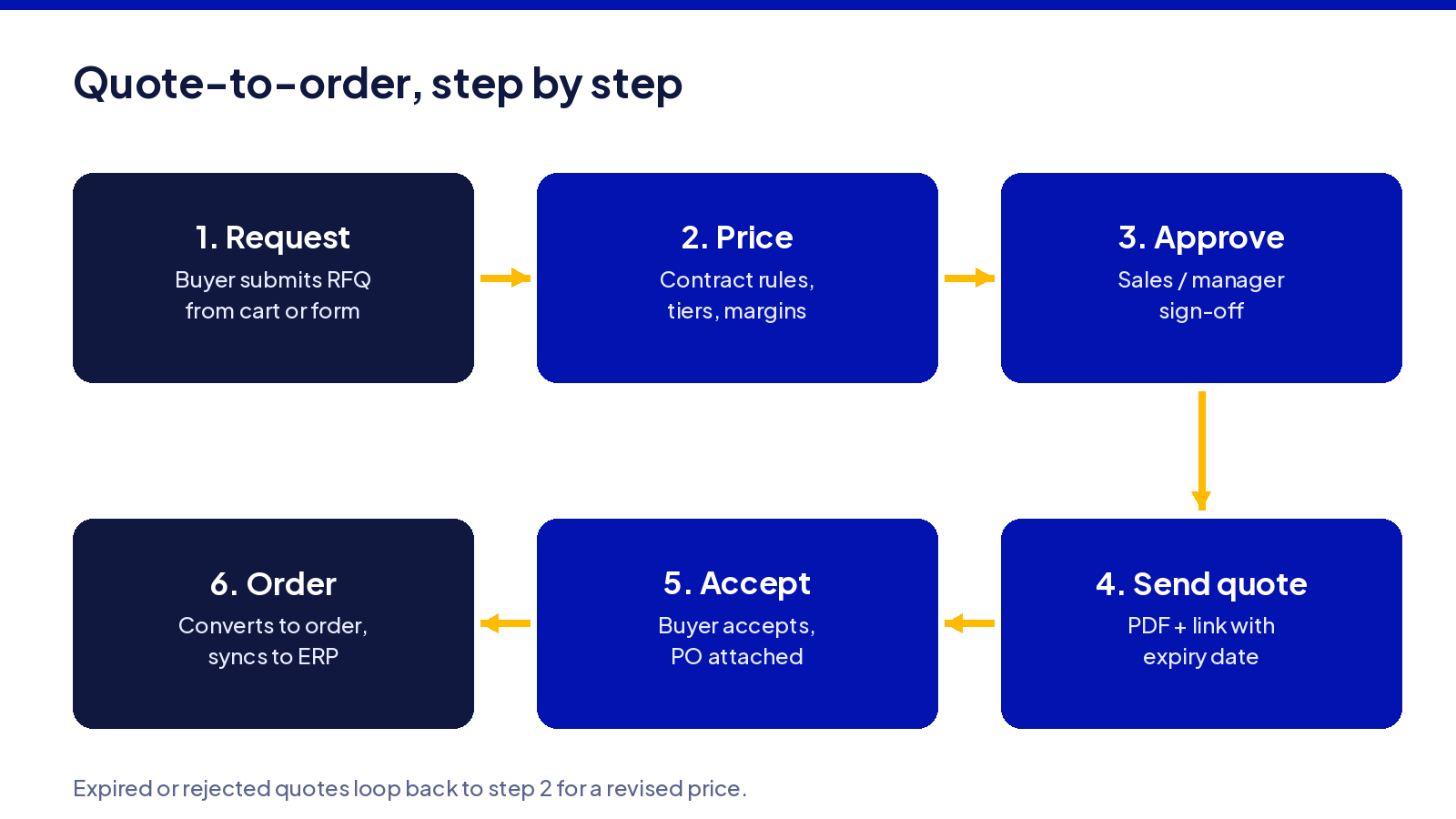
This section walks stage by stage through a typical quote-to-order flow for a B2B ecommerce site. Each step should be visible in the ecommerce UI and mirrored in internal systems. When any stage lives only in email or a spreadsheet, data gets lost and the sales cycle stretches.
1. Quote request (RFQ) from the ecommerce storefront
RFQs can start from three places in the storefront: a “Request a quote” button on the product detail page, a cart-level “Request quote for these items” action, or a quick-order form where buyers paste SKU or part number lists (including CSV uploads for bulk).
The minimum fields worth capturing:
- Company name or account ID, and the contact person
- Delivery country and required delivery date
- Target quantities
- Technical specs such as material, finish or certification requirements
Forcing authenticated account login improves customer data quality and lets the system tie RFQs to contract pricing and purchasing patterns. Guest RFQs lower friction for a potential customer but risk missing vital account information. The trade-off depends on how much of your revenue comes from new versus returning buyers.
One failure mode seen repeatedly: customer inquiries arriving by email, phone, and portal with no unified identifier. Sales reps cannot track which RFQs have been answered, who owns each one, or whether some were simply lost because they entered outside the ecommerce system.
2. Pricing and configuration
When an RFQ arrives, the ecommerce system should call pricing logic that accounts for customer specific pricing, contract prices, volume discounts, applicable discounts, and active promotions. For configurable products, a configurator or CPQ (configure price quote) engine must enforce valid combinations before pricing calculations begin.
Pricing should run against live data from enterprise resource planning systems where possible: current costs, exchange rates, and inventory on hand or expected replenishment. Cost estimates are often based on material costs, labour hours, and overhead. Stale cost data turns accepted quotes into loss-making orders. Premium materials can increase baseline costs compared to standard alternatives; if the pricing service does not reflect that difference in real time, the quote will be wrong.
A production insight: a missing dependency rule in a configurator can produce a quote for an electric motor with a voltage and casing material that are physically incompatible. The buyer accepts. Production rejects the order. Highly intricate designs require more labour, time, and specialised machinery; the configurator must model those constraints, not just list options.
3. Internal review and approval
Approval workflows exist to protect margin, enforce payment terms, and ensure operational feasibility. Rules typically trigger based on discount level versus minimum margin, total deal size, requested payment terms, or unusual conditions such as extended credit or custom packaging. Sales reps may approve small discounts on their own. Larger discounts route to a sales manager. Finance reviews custom credit. Operations checks capacity for made-to-order items.
Approval routing should live in a workflow engine or within the ecommerce/CPQ layer, not in email chains. Every approval record should capture who approved what, when, and under which rule. This audit trail matters for contract management and compliance.
A failure seen in production: “side agreements” made on the phone (“we’ll include the spare seal kit at no charge”), never entered into the system, never passed through the approval chain. The buyer accepts the quote. The ERP order does not include the free item. The customer disputes the invoice. The sales team loses credibility, and customer relationships take damage that is hard to measure but real.
4. Buyer acceptance of the quote
Common acceptance paths include click-to-accept in a customer portal, e-signed PDF, or a formal purchase order referencing the quote ID. The ecommerce account area should show quote status (requested, quoted, under negotiation, approved, expired), expiry date, and a clear call to action to accept or request changes. Buyers expect to track quote status without calling a sales representative.
Partial acceptance needs explicit handling. A buyer may accept some lines and reject others. The system must create an order only for accepted lines, with rejected lines either reopened for renegotiation or cancelled. This back and forth is normal in B2B: the negotiation loop is part of the customer experience, not an exception.
An engineering note: storing quote versions and change history matters when procurement returns months later querying a price. You need to know which version reached final agreement, what it covered, and what changed between versions. Without versioning, disputes are unresolvable.
5. Converting an accepted quote into a clean sales order
Conversion should be one action. The same line items, unit prices, applicable taxes, shipping terms, addresses, and special conditions pass straight into the ERP or order management system. The quote ID should persist on the order record for reconciliation, reporting, and customer support.
At order stage, additional information is often required: internal reference numbers, labelling instructions, preferred delivery windows, or customs documentation. Requests for quotation (RFQs) usually outline delivery timeline and terms; the order must honour those terms exactly.
One observed failure mode: a sales rep converts a quote, then manually edits the order (adding lines, changing a discount, adjusting quantities) so that the order no longer matches the version the buyer accepted. When the ERP generates the invoice, the buyer refuses to pay for items they never agreed to. Preserving the link between accepted quote and order is not a nice-to-have; it is the mechanism that prevents disputes.
6. Fulfilment, shipment, and invoicing
Once the order is confirmed, fulfilment begins. For stocked items, picking and packing starts. For made-to-order products, the order triggers production scheduling or purchasing. Shipping costs are influenced by geographic distance, weight, and freight method; these should already be reflected in the quote.
Shipment and delivery status should sync back to the ecommerce portal. Buyers expect to see whether their quoted order is “in production”, “picked”, “shipped”, or “delivered”. Self-service access to quotes and order status improves customer retention.
Invoice generation follows its own rules. Some transactions require a pro-forma invoice for prepayment, then a final invoice. For large custom projects, milestone billing applies (e.g. 30% on order, 40% at mid-production, 30% on delivery). Quotes typically include unit price, total cost, shipping estimates, and payment terms. The invoice must tie to the original quote and order for those terms to align.
A practical note: quote line units may be “pallets” but the ERP handles “pieces”. This mismatch causes invoice disputes when the buyer expects 10 pallets and gets charged per piece, or sees different rounding. Aligning units of measure across systems is a data problem, not a feature problem, and it needs solving before launch.
How do you enable customer-specific quotes inside a B2B ecommerce platform?

You need four things: account structures that model real buyer organisations, pricing rules that reflect contracts and negotiated pricing, RFQ workflows tied to those accounts, and a quote object that can become an order without re-entry. This applies whether you are building on Medusa.js, a custom Next.js frontend, or another headless B2B ecommerce stack.
Account structures and pricing rules
A company may have multiple locations, cost centres, and divisions. Each might carry distinct negotiated price lists, credit terms, or pricing tiers. The system needs parent/child account hierarchies to model this.
Customer specific pricing, contract prices, and volume discounts should be stored in a central pricing service or ERP, not hard-coded into the storefront. These pricing rules must be queryable and enforceable at quote time. CPQ enables tailored quotes based on customer preferences by pulling this data automatically.
On the buyer side, approval roles matter too. Some account users may request quotes, others accept them, and a subset may place orders. Customer information and permissions must be modelled explicitly.
An engineering insight: storing price rules as configuration (database tables with an admin UI) rather than embedding discount logic in application code makes changes possible without deployments. Mis-codings in discount logic are a common bug source when business processes are buried in code that only a developer can change.
RFQ user experience on the storefront
UX patterns that work: “Add to quote” alongside “Add to cart” for quote-eligible items; RFQ-only products where the cart action is always a quote request; quick RFQ forms or CSV upload for buyers with SKU lists. Quote generation should be fast. CPQ accelerates the quoting process.
Validation at submission matters. Enforce minimum quantities, required spec fields, and location constraints before the RFQ enters the queue. Block or warn if the account lacks permission or a product is not available to that customer segment.
Showing indicative pricing for logged-in customers before a formal quote reduces surprise. The risk arises if the final price diverges too far from the estimate; buyers feel misled, and customer satisfaction drops. Detailed documents or technical packs can help clarify product requirements to suppliers, reducing that gap.
Many field buyers use phones or tablets. RFQ forms must work on mobile, including file attachments and SKU entry. Slow or awkward mobile flows kill the quote to order conversion rate.
Configuring approval rules for quotes
Rule dimensions include discount percentage thresholds, total order value, product families needing engineering or operations review, unusual payment terms, and country-specific risk or tax eligibility. These rules shape your pricing strategy and protect margin.
Rules should be implemented as data-driven configuration (JSON structures, rules tables) editable via an admin UI, so operations staff can adjust thresholds without requiring a code deployment. This is where many businesses benefit from investing time upfront.
Timeouts and escalations are essential. If an approver does not respond within a defined SLA, the system should escalate to a manager, or flag the quote for manual review. Without escalation, quotes sit in inboxes while the buyer moves to a competitor.
A realistic failure: when approval rules are fragmented across ERP, customer relationship management tools, and email templates, some quotes get approved twice (over-discounting) while others are skipped entirely (legal risk). Consolidating rules into one system eliminates this class of error.
Integrating quote-to-order with ERP, CPQ and CRM
Decide early which system is the system of record for quotes and orders. Often it is the ERP or CPQ, not the storefront. That decision should be explicit and documented, because it determines where data conflicts are resolved.
Data flows typically look like this: ecommerce frontend sends the RFQ to the CPQ for configuration and pricing; the CPQ pushes the confirmed quote to the ERP for order creation and inventory reservation; the ERP sends stock levels, fulfilment status, and invoice data back to the ecommerce portal. Data must sync bi-directionally between sales and operational systems. CPQ integrates with CRM and ERP systems to keep customer interactions consistent across touchpoints.
You need idempotent APIs and stable identifiers so that retrying a quote conversion does not create duplicate orders. Without idempotency, a network timeout during conversion can produce two sales orders for the same quote, and only one of them will match what the buyer accepted.
A concrete production issue: when tax rules changed in the ERP but the ecommerce storefront cached old tax rates, the invoice tax did not match the quoted tax. The buyer objected. Support spent hours comparing versions. This class of bug is invisible in staging environments that do not simulate tax-rate changes mid-quote.
Where quote-to-order breaks once you have real customers and real data
Most quote-to-order failures are not about missing features. They are about stale data, inconsistent rules, and manual escape hatches that persist long after the system could handle the work. The operational reality is that these breakdowns compound: one stale price list creates dozens of incorrect price quotes before anyone notices.
Stale prices and out-of-date costs
Quoting off a static price list fails when raw material or FX costs move weekly. Key factors influencing pricing include order volume, material quality, complexity, urgency, logistics, and market volatility. Fluctuations in raw material costs and currency exchange rates can alter pricing validity.
Long validity periods are risky. A formal quote is generally valid for a limited period. In volatile markets, 90-day expiries expose the seller to cost shifts and input shortages that turn accepted quotes into losses. Higher order quantities usually reduce per-unit cost due to distributed fixed costs, but that calculation is only correct if the underlying material cost is current.
Mitigation patterns: daily syncs from ERP or costing systems, cost-based guardrails (minimum margin thresholds that block quotes below cost), and recalculation on acceptance with clear notification to the buyer.
An engineering observation: a nightly job to import new exchange rates failed silently for several days. Dozens of quotes were generated with old, undervalued cost bases. No alert fired because the job reported “success” (it ran; it just fetched empty data). Monitoring must check data freshness, not just job status.
Expired quotes and unclear validity rules
Every B2B quote needs an explicit expiry date visible to both seller and buyer. A quote should be evaluated for accuracy regarding specifications, quantities, and additional charges before acceptance; that evaluation must happen before expiry.
On expiry, the system should auto-cancel the quote or prompt for a re-quote, requiring fresh approval. What actually happens in many organisations: sales reps extend quote validity by email without updating the system record. The buyer later accepts verbally or sends a purchase order referencing the expired quote. The system rejects it. The dispute lands on customer support.
Whatever validity period you set must be enforced in the system, not only printed on PDFs. Expired quotes should move into a “needs review” queue rather than being silently deleted, so the sales team retains the history for repeat business discussions.
Manual re-keying between ecommerce, ERP and CRM
Manual processes persist in surprising places: copying line items from PDF quotes into ERP orders, typing customer addresses, re-entering reference numbers. Automated quoting removes errors that often originate from exactly this kind of re-keying.
Mismatches happen: wrong SKUs, wrong unit of measure, wrong shipping address, mismatched discount. Support teams only discover these when the customer complains, by which point the invoice has been sent and the relationship is strained.
Proper integration maps quote objects and line items 1:1 between systems using shared identifiers. Every line item carries a persistent ID, unit of measure, and pricing reference that travels from ecommerce to ERP to invoice.
A detail only visible in production: Sunday-night spreadsheet uploads that quietly overwrote correct price rules with stale data, introducing errors into quotes generated the following week. Manual tasks like these are slow and introduce risk.
Fragmented status and missing visibility for buyers
When RFQs, quotes, purchase orders, and orders all live in different systems and email threads, buyers cannot see where things stand. Customer expectations in B2B are clear: a single portal view showing “Requested”, “Quoted”, “Accepted”, “In production”, “Shipped”, “Invoiced”. Self-service ecommerce portals that surface this status reduce support calls and improve customer retention.
Sync latency matters. If a batch sync runs every 12 hours, an accepted quote can show as “pending” in the portal for half a day, triggering unnecessary calls or even cancellations. Automated quote processes can increase order volume and efficiency, but only if the buyer trusts what the portal shows.
A lesson from shipped systems: expose “last updated” timestamps on every status change. Even if the status has not changed, showing “Last updated: 14 minutes ago” tells the buyer the data is fresh. That small detail reduces perceived errors noticeably.
The trade-offs when designing your quote-to-order flow
Designing a quote-to-order flow means choosing between speed and control, flexibility and consistency, simplicity and depth of integration. There is no single correct design. The goal is clarity on what each trade-off costs in operational effort, risk, and sales efficiency.
Speed for the buyer vs control for finance and operations
Faster quote response improves win rates. Auto-approval for low-value or repeat orders with standard payment terms speeds things up for low-risk deals and shortens the sales cycle.
But weak controls on margin or credit expose you to losses. Over-approving in code (“always yes under S$5,000”) can be as risky as pushing every quote into a manager’s inbox, because it removes the human check on edge cases. The quote to order process must balance responsiveness with accurate quotes that protect the business.
Once a sales team gets used to bypassing approval flags, reintroducing tighter controls meets internal pushback. Design the controls you need from the start, even if you set thresholds generously in the first months.
Standardised process vs exceptional, engineer-heavy deals
Many manufacturers have two flows: a standard sales process for catalogue items and repeat business, and a heavier workflow for custom-engineered products with complex product configurations. The quote-to-order process starts with product configuration in both cases, but the depth of configuration differs.
The risk of cramming every scenario into one “mega workflow” is real. Users constantly query which path to take, forms demand fields that are irrelevant for simple orders, and things fall back to email because the system feels slow. Splitting paths based on product type or configuration complexity, while keeping shared IDs and reporting, is more practical.
Large custom projects often need attached drawings, technical specifications, and negotiated delivery schedules that do not fit cleanly into standard ecommerce schemas. Technical drawings and required specifications help suppliers assess manufacturability. Forcing these into a generic line-item structure creates data that looks complete but is not usable by engineering or production. Expedited production may incur additional rush fees; factors like limited stock or urgent production may result in higher prices or rush charges. These variables need a flexible quoting path.
Deep integration vs keeping systems loosely coupled
Full real-time integration between ecommerce, ERP, CPQ, CRM, and WMS brings accuracy and avoids duplicate data. Quote-to-order automation improves operational workflow efficiency when all systems share a single source of truth.
The trade-offs: more moving parts, more failure points, and heavier testing each time any system changes. Every API dependency is a potential outage. Every schema change in the ERP risks breaking the storefront.
Lighter patterns exist: daily or hourly batch syncs, event-based updates, or synchronising only essential fields (status, pricing, stock) while deferring less critical data. These patterns delay some information but are simpler to operate and more resilient to individual system failures.
An engineering trade-off: tying quote logic tightly to a single ERP vendor’s data schema can make replatforming almost as much work as a full rewrite of the quoting system. Loose coupling at the quote layer preserves future flexibility, at the cost of accepting some sync latency today.
How we approach quote-to-order projects at KVY TECH
We build ecommerce systems from scratch with quote-to-order as an explicit architecture decision, not a feature bolted on after launch. Engagements start with a discovery sprint to map all existing quote flows (emails, spreadsheets, ERP screens) and design a clean target process with clear handoffs. We treat multi-currency, local payment, and tax handling as architecture decisions made in the first week, not last-minute features added before go-live.
We have experience with complex ecommerce and internal systems where customer specific pricing, promotions, and local payment methods are requirements from week one. JML Singapore Pte Ltd outgrew off-the-shelf tooling: promotion logic had become a stack of workarounds, regional expansion needed real multi-currency support, and Singapore payment methods had to work every time. We recommended Medusa.js after reviewing alternatives and noted before work started that a SaaS platform would ship faster but leave technical debt that would cost years. From the first commit the client owns code, infrastructure configuration, and documentation. We execute weekly demos of working software. Projects often run 8 to 16 weeks with a fixed-scope first phase that includes account structures, pricing rules, and RFQ/quote-to-order flows when those are required. More detail on how we structure these projects is on our B2B ecommerce development page.
Frequently asked questions
How do I enable customer-specific quotes in ecommerce?
You need authenticated customer accounts, a pricing service that understands contracts and personalized pricing, RFQ forms tied to those accounts, and an internal workflow for approvals. On a custom stack (e.g. Next.js + Medusa.js + ERP) this means adding a “quote” entity with quote APIs and an admin UI for the sales team to manage quotes. The hardest part is often data: cleaning existing spreadsheets and ERP price lists so the rules are consistent enough to automate. Many businesses underestimate this step.
How does ecommerce work when every order needs a quote?
Buyers browse the catalogue, build a cart, and submit it as an RFQ instead of checking out immediately. Once the quote is approved internally and accepted by the buyer, conversion to a sales order happens with one click, reusing the same cart structure. For repeat business, loyal customers can duplicate old quotes, adjust quantities, and request updated pricing instead of starting from scratch. This pattern lets you cross sell related products during the quoting stage, when the buyer is already reviewing specifications and quantities.
How long should a B2B quote stay valid?
Validity depends on cost volatility, supply lead times, and how often your pricing rules update. Aligning validity with your price-list refresh cycle ensures that accepted quotes still make operational sense. Whatever period you pick must be enforced in the system, not only printed on PDFs. When the system does not enforce expiry, sales representatives extend dates informally, and disputes follow when procurement tries to accept a quote whose costs have shifted.
What if my ERP cannot support quote-to-order natively?
One common pattern is to keep quotes in the ecommerce or CPQ layer and only push confirmed orders into the ERP as standard sales orders. The ERP sees clean orders; the ecommerce layer holds quote history, approvals, and pricing logic. This approach is common when working with older management systems where changing core quote objects would be risky and expensive. It also means your efficient workflow for customer requests does not depend on ERP upgrade cycles.
Can I start with manual approvals and automate later?
Many teams start with simple manual approvals modelled inside the ecommerce admin before moving to rule-based automation. The key is designing the data model (who approved what, when, under which rule) from the start, so you can add rules without migrating data. The danger is leaving temporary email-based approvals in place long after the system could handle them cleanly. Once manual processes become habit, successful implementation of automated approval routing requires re-training, not just configuration.
Tell us what you are building. We reply within one working day.