


This is not an article about whether to leave Sharetribe. If you are here, that decision is made, or close to it, and what you need now is the part nobody writes about properly: how to move a living marketplace, vendors, buyers, listings, reviews, transaction history, search rankings, from one platform to another without breaking it.
The good news up front: to migrate from Sharetribe is a solved category of project. Sharetribe is a well built platform with real data access, its Integration API exposes your marketplace’s users, listings, transactions, and messages, and its Console exports core data as CSV. The community losing migrations you have heard about are not caused by platforms; they are caused by skipped steps. This guide is the steps.
Teams searching for how to migrate from Sharetribe usually land here from one of two places: a spreadsheet of rising fees that finally crossed the line, or a feature request that the platform structurally cannot serve. Either starting point leads to the same project, and the project is more mechanical, and more forgiving of a good plan, than the horror stories suggest.
Still weighing the decision itself? Start with the signs you’ve outgrown your platform and a stay or switch framework, then come back here for the mechanics of the move.
What it actually takes to migrate from Sharetribe
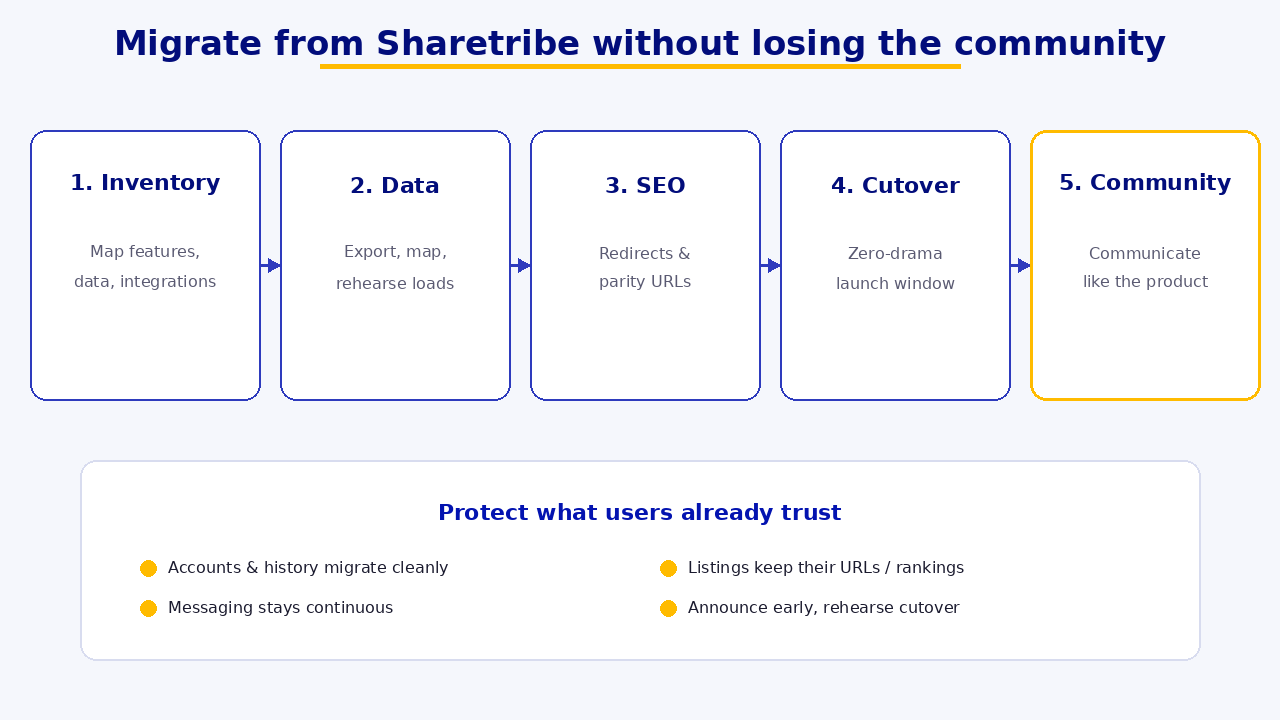
Four things, in ascending order of difficulty: data (users, listings, transactions, reviews, with the relationships between them intact); money plumbing (vendor payout arrangements, typically Stripe based on Sharetribe); search equity (the rankings and URLs your traffic depends on); and habits (how vendors and buyers use your marketplace daily, the one thing no API exports). A plan to migrate from Sharetribe is really four parallel plans, sequenced so nothing breaks publicly.
Phase 1, inventory and plan (before any code)
Start with a complete inventory of what exists: user counts and roles, listing volume and custom fields (extended data on Sharetribe carries your custom attributes, map them explicitly), open and historical transactions, reviews, and every URL that receives organic traffic (pull this from Search Console now; you will need it in Phase 3).
Then decide what moves versus what archives. Not everything deserves migration: closed listings from three years ago may belong in an archive export rather than your new database. The rule: migrate what the community would miss, archive what compliance requires, drop the rest deliberately.
For marketplaces operating out of Singapore and the wider region, add one more line to the Phase 1 inventory: payout currency and local payment rail mapping. If your Sharetribe setup pays vendors in a single currency through Stripe and your destination needs multi currency payouts or a local rail, that is a Phase 2 decision, not a Phase 4 surprise. Teams that discover this during cutover week are the ones who end up running a manual payout spreadsheet for a quarter while the real integration catches up.
Finally, sequence the project with a parallel run assumption: the old marketplace stays fully live until the new one has demonstrably worked. Migrations to migrate from Sharetribe fail publicly when the plan requires the new platform to be perfect on day one. Yours should not.
Phase 2, data: export, map, rehearse

Export: Sharetribe gives you two complementary routes, CSV exports from Console (users, listings, transactions, reviews, good for inventory and verification) and the Integration API, which is the proper migration tool, programmatic access to the full marketplace dataset, including relationships and extended data. Build your export scripts against the API; use the CSVs as your checksum.
Map: the real work is schema mapping, Sharetribe’s data model (users, listings, transactions, extended data) onto your new platform’s model, including how custom fields translate, how listing states map, and how reviews attach to the right users and transactions on the other side. Two items deserve special, honest handling.
A concrete example makes the schema mapping work less abstract. Say a Sharetribe listing carries an extended data field for “delivery radius” that your new platform’s catalog model does not have natively. Someone has to decide, explicitly, whether that becomes a structured attribute, a free text note, or a computed value derived from the vendor’s address, before the import script runs, not while it is running. Multiply that decision by every custom field in your listings, and you can see why the map step of a plan to migrate from Sharetribe takes longer than the export step, even though export is the one that looks technically harder.
- Passwords do not migrate. No platform exports password hashes, expect this, and design the re-onboarding flow now: pre-created accounts with a friendly “set your password” activation, timed with your communication plan (Phase 5). Done well, this is a one-click moment, not a churn event.
- Vendor payment accounts. Sharetribe payouts run on Stripe; whether vendors’ connected accounts can carry over depends on how they were created and where you are going, platform to platform paths exist in some configurations. Confirm the specifics with Stripe early, because the answer shapes whether vendors re-onboard payments or barely notice.
Rehearse: run the full export transform import pipeline against a staging environment at least twice before the real thing. The first rehearsal finds the mapping bugs; the second proves the fix. Measure the runtime, it becomes your cutover window.
One piece we are deliberately leaving out of this guide: how split payments and commission payouts work once vendors are on the new platform. That mechanics question, how money actually divides between platform and seller after the migration, is its own topic and deserves its own dedicated breakdown rather than a paragraph here.
Phase 3, SEO: move the rankings with the marketplace

Search equity is an asset you own only if you carry it deliberately when you migrate from Sharetribe. The mechanics are unglamorous and non-negotiable.
- Map every URL that matters (from your Phase 1 Search Console pull) to its new equivalent: listing pages, category pages, vendor profiles, content.
- 301-redirect old URLs to new ones at launch, one hop, not chains. If your URL structure changes shape, the mapping table is the deliverable; budget real hours for it.
- Preserve what ranks: titles, meta, and on-page content of top-performing pages should move recognizably, not be rewritten in the same week you replatform. One change at a time.
- Relaunch hygiene: new XML sitemap submitted at cutover, Search Console property verified for the new stack, and a post-launch crawl to catch 404s while they are cheap.
Expect some ranking turbulence for a few weeks even in a clean migration, that is normal. What is not normal, and not recoverable, is skipping the redirect map.
Phase 4, cutover: the zero-drama version

The pattern that works is boring by design: a parallel run (new platform live at a staging domain, fully tested with real migrated data), a short content freeze (announced in advance, no new listings or edits for a defined window while the final data sync runs), the final delta migration (only what changed since the last rehearsal, this is why you measured the runtime), a DNS and domain switch with redirects live from minute one, and a hypercare window (the team watching orders, payouts, and support channels closely for the first days).
Old platform stays accessible (read only if possible) until every open transaction has closed cleanly. Then, and only then, wind it down.
Budget the hypercare window generously. The teams that regret a rushed migration almost never regret the days they spent watching dashboards after cutover, they regret the ones they skipped. When you migrate from Sharetribe, the first 72 hours after DNS switches is when a mapping bug that survived two rehearsals finally shows up in production, on a real order, in front of a real vendor.
Phase 5, the community: communicate like it is the product
Because it is. The technical side of any project to migrate from Sharetribe succeeds or fails in private; the communication succeeds or fails in public.
Vendors first, and earlier than feels comfortable. They have the most to re-learn (new dashboard, possibly payment re-verification) and the most to lose from surprises. Tell them what is improving, what they need to do, and exactly when, then give the most active vendors early access so your power users become your guides.
Buyers need less, later: what is new, the one action if any (password activation), and reassurance that their history and reviews came along.
During the freeze and cutover, over-communicate: a visible banner, a dated timeline, and a fast support lane. Silence during a migration reads as instability; narration reads as competence.
Write the vendor announcement before you write a line of migration code, not after. Drafting it early forces you to answer the questions vendors will actually ask, what happens to my payout schedule, do I need to re-upload my catalog, will my reviews carry over, and any gap in those answers becomes a task on your Phase 1 checklist instead of a support ticket during cutover.
The honest summary: what it takes to migrate from Sharetribe well
A plan to migrate from Sharetribe without losing the community is four moves, data, money, SEO, habits, run in parallel with a rehearse, freeze, cutover spine. None of it is exotic; all of it punishes improvisation. The communities that get lost in migrations are lost to skipped rehearsals and surprise emails, not to technology.
Where we can help is the destination: if the marketplace you are migrating to is a custom build, that is what we do, the data model it lands in, the money flow, the vendor layer. If Medusa is on your shortlist for that destination, worth reading first before you commit to it. Discuss your project with us and we will be straight about which phases you can run yourselves and which are worth the help.
FAQ
Can you export your data from Sharetribe?
Yes. Sharetribe’s Console exports users, listings, transactions, and reviews as CSV, and its Integration API gives programmatic access to the full marketplace dataset including relationships and extended data. The API is the right tool when you migrate from Sharetribe for real, with CSVs as verification.
Do users have to create new accounts after a marketplace migration?
Accounts and their data can be migrated, but passwords cannot, no platform exports password hashes. The standard pattern is pre-created accounts with a set-your-password activation flow, announced as part of the migration communication.
How long does it take to migrate from Sharetribe?
The data pipeline is usually weeks of engineering including rehearsals; the full project (planning, new platform readiness, parallel running, communication, cutover) typically spans a few months. The cutover itself, done right, is hours.
Will migrating hurt our SEO?
A clean migration with a complete 301 redirect map, preserved on-page content, and proper sitemap and Search Console hygiene typically sees only short-term turbulence. The migrations that permanently lose rankings are the ones that skip the URL mapping.