


B2B payment terms are one of those pieces of ecommerce infrastructure that look like a business decision until you actually build them, at which point they turn out to be a real architectural commitment: net terms, credit limits, and approval workflows all have to be enforced in real time at checkout, not just recorded in an invoice afterward. Getting B2B payment terms right is what lets a buyer place a $50,000 order on 30-day terms with confidence it will actually be honored, and what protects the seller from extending more credit than a buyer can reasonably repay. This is a practical look at how B2B payment terms actually work under the hood, not just what they mean on an invoice.
What net terms actually mean operationally
“Net 30” (or net 60, net 90) means the buyer’s company, not the individual placing the order, is being extended credit for that period. Operationally, this means the order needs to be fulfilled and shipped before payment is collected, the invoice needs to be generated and tracked against a due date, and the seller is carrying that receivable as real financial exposure until it’s paid. None of this is unique to B2B payment terms as a concept, businesses have extended trade credit for centuries, but implementing it inside an ecommerce checkout flow (rather than a sales rep manually approving each order) is where it gets technical.
Credit limit as a real-time constraint, not a static field
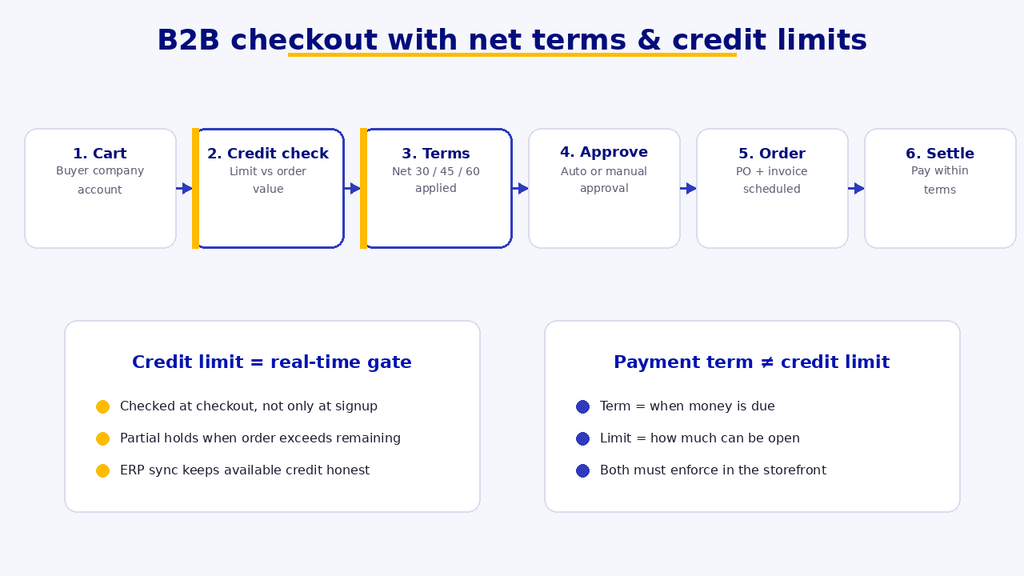
The naive implementation treats a buyer’s credit limit as a single static number checked once. The correct implementation treats it as a running balance: credit limit minus outstanding invoices minus the order currently in the cart, checked at the moment of checkout, every time. A buyer with a $20,000 credit limit and $18,000 in unpaid invoices should not be able to place a $5,000 order on net terms, even though their limit alone looks fine on paper. Getting this wrong is the single most common B2B payment terms bug: checking the limit against the buyer’s account in isolation instead of against their current outstanding balance.

Where credit risk actually sits
Two structurally different setups exist here, and confusing them is a common architecture mistake. In an in-house model, the seller directly carries the credit risk: they’re the ones out the money if a buyer doesn’t pay, so credit limits need to be set conservatively and monitored closely. In a third-party model, a trade credit or B2B financing provider underwrites the buyer and pays the seller upfront, taking on the collection risk themselves in exchange for a fee. The third-party model removes the seller’s exposure but adds an underwriting step (and possible decline) to every order over the provider’s risk threshold, which needs to be handled gracefully in the checkout flow rather than as a hard failure.
The full B2B checkout flow with payment terms
- Buyer’s company account is checked for an active credit line and current outstanding balance before the cart is even shown.
- At checkout, the order total is checked against remaining available credit (limit minus outstanding minus this order), not against the limit alone.
- If a third-party credit provider is involved, an underwriting check runs at this point, which can add a short delay or an outright decline.
- On approval, the order proceeds without upfront payment; an invoice is generated with the agreed net terms and a due date.
- The invoice is tracked against payment; overdue invoices should automatically tighten available credit for that buyer’s next order.
Where ERP fits
For most B2B sellers of any real size, the receivables ledger, credit limits, and invoice status shouldn’t live solely in the ecommerce platform. They live in the ERP (or accounting system), and the ecommerce checkout needs to query that system in close to real time to make an accurate credit decision. Building B2B payment terms as an ecommerce-only feature, disconnected from the system of record for actual financials, is a common way teams end up with two conflicting versions of a buyer’s credit status: one the storefront thinks is true, and one the finance team is actually working from.
Common mistakes worth naming directly
- Checking credit limit against the account instead of against outstanding balance plus the current order.
- Treating B2B payment terms as purely a display setting on the invoice rather than an enforced checkout rule.
- Not tightening credit automatically when invoices go overdue, so a buyer with a bad payment history keeps getting approved.
- Building the credit check as a one-time integration instead of a live query, so the ecommerce platform’s view of a buyer’s balance drifts out of sync with the ERP.
A short B2B payment terms checklist
A condensed version of the internal checklist we use when auditing a B2B payment terms setup, useful as a quick self-check before assuming yours is solid:
- Credit limit is checked as a live balance (limit minus outstanding minus current order), not a static field.
- Overdue invoices automatically reduce a buyer’s available credit for future orders.
- Net terms are enforced at checkout, not just displayed on the resulting invoice.
- Credit and invoice data comes from the ERP or accounting system as the source of truth, queried live rather than duplicated and allowed to drift.
- Third-party credit provider declines (if applicable) are handled as a graceful checkout state, not a hard error.
- Buyers can see their own available credit and outstanding balance before attempting to check out.
- Finance has a way to manually adjust a specific buyer’s credit limit without a code deployment.

One more distinction worth making explicit: B2B payment terms and payment methods are not the same lever. A buyer can be approved for net 30 terms and still be required to pay by ACH or wire rather than card, since card processing fees on large B2B orders are often uneconomical for the seller to absorb. Keeping payment method and payment terms as separate settings, rather than bundling them into one “how does this buyer pay” field, makes it much easier to adjust one without accidentally breaking the other later.
How this connects to the rest of a B2B storefront
B2B payment terms don’t exist in isolation from the rest of what makes a B2B storefront different from a B2C one, company accounts, custom pricing, and approval flows all interact with credit and net terms in the same checkout session. If you’re evaluating how far a platform needs to stretch to support B2B payment terms alongside those other requirements, that broader comparison is covered in our piece on what makes B2B ecommerce harder than B2C. And once net terms and credit limits are working, the next layer most B2B sellers eventually need is a clear model for how commission or referral splits interact with net-terms invoicing, which is a separate architectural question worth planning for early rather than retrofitting.

B2B payment terms are one of those pieces of ecommerce infrastructure that look like a business decision until you actually build them, at which point they turn out to be a real architectural commitment: net terms, credit limits, and approval workflows all have to be enforced in real time at checkout, not just recorded in an invoice afterward. Getting B2B payment terms right is what lets a buyer place a $50,000 order on 30-day terms with confidence it will actually be honored, and what protects the seller from extending more credit than a buyer can reasonably repay. This is a practical look at how B2B payment terms actually work under the hood, not just what they mean on an invoice.
What net terms actually mean operationally
“Net 30” (or net 60, net 90) means the buyer’s company, not the individual placing the order, is being extended credit for that period. Operationally, this means the order needs to be fulfilled and shipped before payment is collected, the invoice needs to be generated and tracked against a due date, and the seller is carrying that receivable as real financial exposure until it’s paid. None of this is unique to B2B payment terms as a concept, businesses have extended trade credit for centuries, but implementing it inside an ecommerce checkout flow (rather than a sales rep manually approving each order) is where it gets technical.
Credit limit as a real-time constraint, not a static field
The naive implementation treats a buyer’s credit limit as a single static number checked once. The correct implementation treats it as a running balance: credit limit minus outstanding invoices minus the order currently in the cart, checked at the moment of checkout, every time. A buyer with a $20,000 credit limit and $18,000 in unpaid invoices should not be able to place a $5,000 order on net terms, even though their limit alone looks fine on paper. Getting this wrong is the single most common B2B payment terms bug: checking the limit against the buyer’s account in isolation instead of against their current outstanding balance.
Where credit risk actually sits
Two structurally different setups exist here, and confusing them is a common architecture mistake. In an in-house model, the seller directly carries the credit risk: they’re the ones out the money if a buyer doesn’t pay, so credit limits need to be set conservatively and monitored closely. In a third-party model, a trade credit or B2B financing provider underwrites the buyer and pays the seller upfront, taking on the collection risk themselves in exchange for a fee. The third-party model removes the seller’s exposure but adds an underwriting step (and possible decline) to every order over the provider’s risk threshold, which needs to be handled gracefully in the checkout flow rather than as a hard failure.
The full B2B checkout flow with payment terms
- Buyer’s company account is checked for an active credit line and current outstanding balance before the cart is even shown.
- At checkout, the order total is checked against remaining available credit (limit minus outstanding minus this order), not against the limit alone.
- If a third-party credit provider is involved, an underwriting check runs at this point, which can add a short delay or an outright decline.
- On approval, the order proceeds without upfront payment; an invoice is generated with the agreed net terms and a due date.
- The invoice is tracked against payment; overdue invoices should automatically tighten available credit for that buyer’s next order.
Where ERP fits
For most B2B sellers of any real size, the receivables ledger, credit limits, and invoice status shouldn’t live solely in the ecommerce platform. They live in the ERP (or accounting system), and the ecommerce checkout needs to query that system in close to real time to make an accurate credit decision. Building B2B payment terms as an ecommerce-only feature, disconnected from the system of record for actual financials, is a common way teams end up with two conflicting versions of a buyer’s credit status: one the storefront thinks is true, and one the finance team is actually working from.
Common mistakes worth naming directly
- Checking credit limit against the account instead of against outstanding balance plus the current order.
- Treating B2B payment terms as purely a display setting on the invoice rather than an enforced checkout rule.
- Not tightening credit automatically when invoices go overdue, so a buyer with a bad payment history keeps getting approved.
- Building the credit check as a one-time integration instead of a live query, so the ecommerce platform’s view of a buyer’s balance drifts out of sync with the ERP.
A short B2B payment terms checklist
A condensed version of the internal checklist we use when auditing a B2B payment terms setup, useful as a quick self-check before assuming yours is solid:
- Credit limit is checked as a live balance (limit minus outstanding minus current order), not a static field.
- Overdue invoices automatically reduce a buyer’s available credit for future orders.
- Net terms are enforced at checkout, not just displayed on the resulting invoice.
- Credit and invoice data comes from the ERP or accounting system as the source of truth, queried live rather than duplicated and allowed to drift.
- Third-party credit provider declines (if applicable) are handled as a graceful checkout state, not a hard error.
- Buyers can see their own available credit and outstanding balance before attempting to check out.
- Finance has a way to manually adjust a specific buyer’s credit limit without a code deployment.
One more distinction worth making explicit: B2B payment terms and payment methods are not the same lever. A buyer can be approved for net 30 terms and still be required to pay by ACH or wire rather than card, since card processing fees on large B2B orders are often uneconomical for the seller to absorb. Keeping payment method and payment terms as separate settings, rather than bundling them into one “how does this buyer pay” field, makes it much easier to adjust one without accidentally breaking the other later.
How this connects to the rest of a B2B storefront
B2B payment terms don’t exist in isolation from the rest of what makes a B2B storefront different from a B2C one, company accounts, custom pricing, and approval flows all interact with credit and net terms in the same checkout session. If you’re evaluating how far a platform needs to stretch to support B2B payment terms alongside those other requirements, that broader comparison is covered in our piece on what makes B2B ecommerce harder than B2C. And once net terms and credit limits are working, the next layer most B2B sellers eventually need is a clear model for how commission or referral splits interact with net-terms invoicing, which is a separate architectural question worth planning for early rather than retrofitting.
Invoicing itself is worth a brief note. Most B2B sellers eventually outgrow manually generated PDF invoices in favor of a system that can track partial payments, send automated reminders, and reconcile against the ERP without manual entry. Stripe Invoicing is a common reference point for what a modern, automated invoicing layer looks like, even for teams that end up building or buying something else specific to their B2B payment terms setup.
Two related pieces worth reading alongside this one: our upcoming article on how commission and referral splits interact with B2B net-terms invoicing (a companion to this piece), and a broader walkthrough of how marketplace payment splitting works, which shares some of the same real-time-balance logic described above even though it’s solving a different problem.
Frequently asked questions
What’s the difference between a credit limit and a payment term?
A payment term (net 30, net 60) is how long a buyer has to pay after an order. A credit limit is how much unpaid balance a buyer is allowed to carry at once. B2B payment terms setups need both enforced together, since a long payment term without a credit limit is effectively unlimited exposure.
Should every B2B buyer get the same payment terms?
No. Most sellers vary net terms and credit limits by buyer, based on order history, company size, or a credit check, rather than offering one fixed term to every account. This needs to be a per-buyer setting in the system, not a global default.
Do B2B payment terms work the same for a first-time buyer?
Usually not. Many sellers require the first order (or first few orders) to be paid upfront, and only extend net terms once there’s a payment history to base a credit decision on.
What happens if a buyer exceeds their credit limit mid-checkout?
The checkout should decline or hold the order at the point the limit is exceeded, ideally showing the buyer their available credit so they can adjust the order rather than hitting an unexplained failure.