


Payment reconciliation is the work of proving that every order, every payment received, every fee, every refund and every payout to a seller agrees with what your books say happened. Done well, finance closes the month without a list of unexplained differences, and nobody is paid twice.
This guide is for owners and finance leads at distributors, marketplaces and businesses selling through several channels. Most guides treat the payment reconciliation process as comparing bank statements with an invoice list. For a business selling through a webstore, sales reps and marketplaces at once, the hard part is matching each order to the actual amount a payment processor settled, after fees, in a batch, on a later date, and then to what was paid out to a seller or supplier.
What payment reconciliation compares
Reconciliation compares internal records of financial transactions with external records of the same money. There are three sources in almost every business that takes payments online:
- Your order or invoice system. What the customer bought, what they were charged, any discount, tax and refund. These are your internal financial records.
- Payment processor reports. What the provider captured, what it charged in fees, and which batch each payment was paid out in.
- Bank statements. What actually arrived in your bank account, usually as one deposit per batch.
A marketplace adds a fourth record: what it owes and has paid each seller. Each amount in your internal records should be traceable to an amount in the external records; anything that cannot be traced becomes an exception a person explains.
The processor’s report is the bridge between the other two. Stripe describes its payout reconciliation report as a way to match the payouts you receive in your bank account with the batches of payments and other transactions they relate to.
Why is payment reconciliation important?
Reconciliation serves three purposes. Revenue, fees and refunds are booked at their real amounts, so the financial statements show what the business actually earned and paid. You know which sales have turned into money in the bank and which are still settling, which is what cash flow planning depends on. And a payment that matches nothing is either a mistake to correct or something to look at closely before it repeats.
Left late, reconciliation holds up reporting, and old errors are harder to trace.
How the payment reconciliation process works
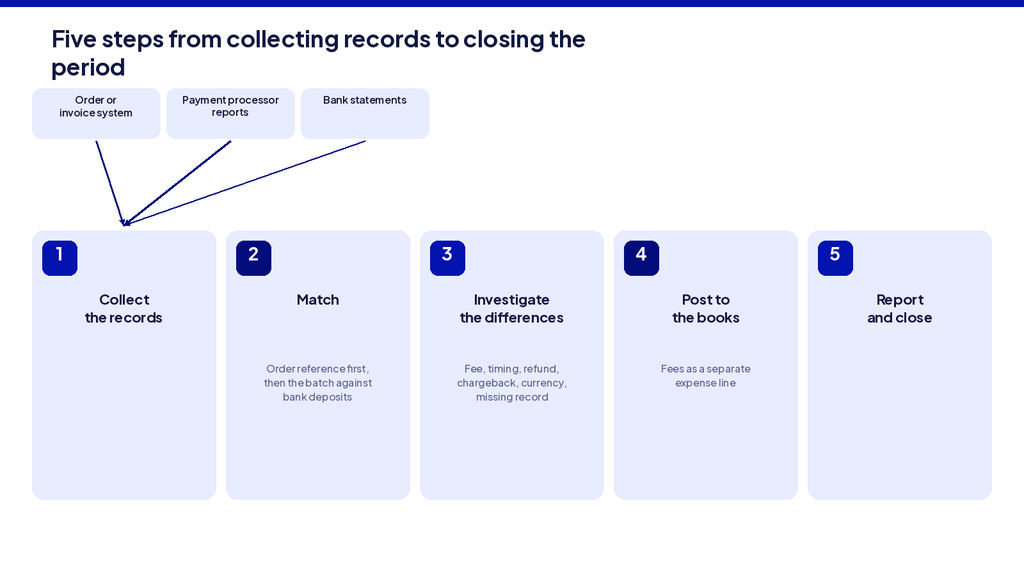
Payment reconciliation work follows the same steps whether a person uses a spreadsheet or payment reconciliation software runs them overnight.
- Collect the records. Pull internal records (orders, refunds and credit notes) and external records: the settlement report from each payment processor and marketplace, and the bank statements for the same period.
- Match. Tie each payment to its order using a shared reference, then tie each settled batch to its bank deposit. Matching on amount alone fails as soon as two orders have the same total.
- Investigate the differences. Anything left unmatched goes into an exception list with a reason: a fee, timing differences, a partial refund, a chargeback, a currency difference or a missing record.
- Post to the books. This is where reconciliation meets the accounting process. Record revenue, fees, refunds and payouts in the accounting system, with transaction fees and bank fees booked as expenses, not netted silently out of sales.
- Report and close. Show what matched, what is still open and who owns each open item, then lock the period.
Keep processor payouts separate from invoice matching: match each order to the processor’s record first, then the payout to the bank.
If the order number travels with the payment into the processor and comes back out in its report, most matching is mechanical. If not, someone matches by amount and date, which stops working as payment volumes grow.
Types of reconciliation you will run
Bank reconciliation
Bank reconciliation compares your cash book with bank records. A business can have a clean bank reconciliation and still not know which orders a deposit paid for.
Settlement reconciliation
Settlement reconciliation checks the processor’s batches. Adyen’s transaction-level reconciliation guide works from its Settlement details report: net credits minus net debits for each payment, refund and chargeback should equal the batch payout. Its batch-level guide then matches those batches to your bank statements.
Credit card reconciliation
Credit card reconciliation matches card payments to orders and to the processor’s settlements. For company cards it also checks credit card statements against receipts.
Cash reconciliation
Cash reconciliation compares the till or driver collections with sales receipts. It catches counting mistakes and, occasionally, employee theft, and many businesses run it by shift or by day.
Digital wallet reconciliation
Digital wallets add another layer. A payment made with Apple Pay reaches you through your card processor, while digital wallet transactions on platforms holding their own balance settle in their own reports. Each wallet needs its own matching rules, keyed by payment method.
Marketplace payout and intercompany reconciliation
A marketplace proves every seller payout equals their sales less commission, refunds and chargebacks. Groups with several legal entities also check that balances owed between companies agree on both sides.
Where the numbers stop agreeing
Most reconciliation errors come from a short list of causes, and each one can be expected and handled by a rule. Each extra payment type and each extra report format adds rules to maintain.
Processing fees
Processors usually deduct their fees before paying you, so the deposit is smaller than the sales behind it. Stripe’s balance transaction object records the gross amount, the fee and the net effect on your balance for each transaction, across transaction types such as charges, refunds and payouts, which is the level at which fees need to be booked.
Settlement timing and batching
Payments captured on one day are paid out on a later day, grouped with others. Adyen notes in its transaction-level guide that weekend sales are paid out together in one batch the following week. Those timing differences at a month-end cut-off are expected, not errors, but they matter for cash flow.
Partial refunds
A customer returns one item from a three-item order. The processor shows a separate refund, possibly in a later batch, and unless it is linked to the order line it looks like a stray debit.
Chargebacks
When a cardholder disputes a payment, the processor takes the money back. Stripe states on its how disputes work page that it debits the disputed amount, plus a dispute fee, from your account.
Currency conversion
A sale in one currency settled into an account in another produces a difference between the order value and the deposit that is neither a fee nor an error. Store the rate with the transaction, or every foreign sale needs manual reconciliation.
Duplicate or missing records
A webhook (the payment notification a processor sends to your system) delivered twice, or a payment captured while the order never saved: these cost real money, because a duplicate can be shipped or paid out twice.
Payment reconciliation examples: discrepancy, cause and fix
Each difference is best fixed in a specific system, often not the one where it was noticed.
| Discrepancy | Usual cause | Where to fix it |
|---|---|---|
| Deposit smaller than sales | Fees deducted before payout | Book fees from the processor report as their own line in accounting |
| Sales recorded, no deposit yet | Settlement delay or batching | Keep a “settling” status in the order system until the batch is matched |
| Deposit with no orders behind it | Order reference not passed to the processor | Send the order number with every payment at checkout |
| Refund with no matching order | Refund issued in the processor dashboard, outside the order system | Issue refunds only from the order system, which then calls the processor |
| Money taken back weeks after shipping | Chargeback | Link disputes to the original order and hold the seller’s share until it is decided |
| Small difference on foreign sales | Currency conversion | Store the settled currency, amount and rate with each transaction |
| Same payment counted twice | Payment notification (webhook) received twice, or a retry | Use a unique key per payment so a second copy is ignored |
| Seller paid more than they earned | Payout calculated from orders, not from settled money | Calculate payouts from settled amounts and block any payout the ledger cannot explain |
The last two rows are the expensive ones: design problems in the commerce system that no month-end check repairs once the money has gone.
Marketplace payment reconciliation: one order, many sellers
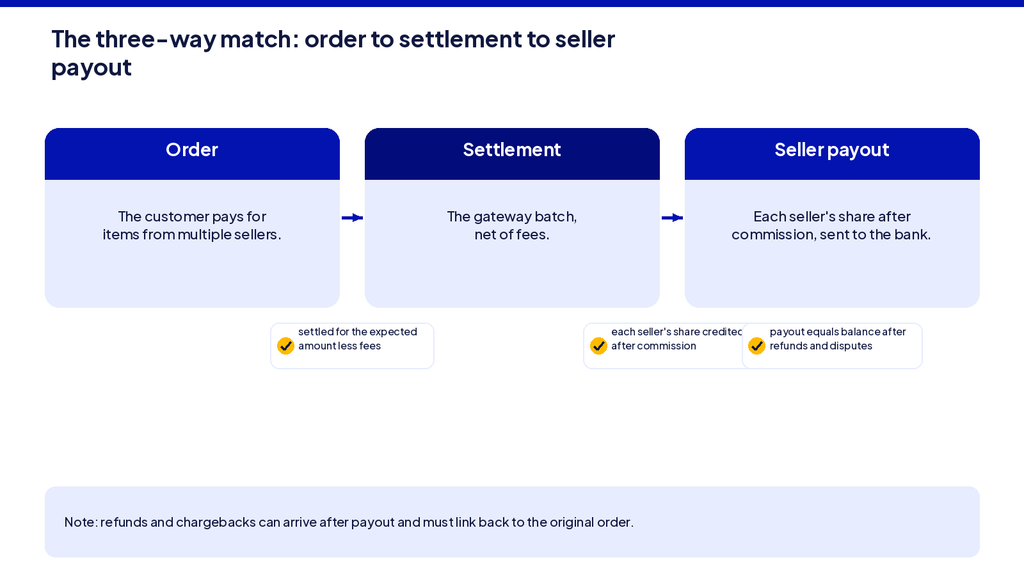
A marketplace order often holds items from several sellers. The customer pays once, the processor settles it less its fee, and the platform owes each seller their share less commission.
Marketplace payment reconciliation therefore needs a three-way match:
- Order to settlement. The payment was settled for the expected amount less fees.
- Settlement to seller balance. Each seller’s share after commission was credited to them.
- Seller balance to payout. The payout equals their balance after refunds and disputes, and reached their bank.
Stripe’s guide to managing connected account payouts covers the third leg, payouts to sellers’ accounts on a platform. How the money is divided in the first place is a design decision of its own, covered in our piece on marketplace payment splitting.
A common design failure is a platform that calculates seller payouts from orders marked as paid, not from money actually settled. When a payment is reversed after the seller is paid, the platform chases the seller for money already sent.
Manual and automated payment reconciliation
What manual payment reconciliation looks like
Manual reconciliation means downloading reports, lining them up in a spreadsheet and ticking off matches. As channels multiply, manual data entry and copying between files invite human error, the work becomes labour-intensive, and the spreadsheet grows faster than the time available to check it.
Automating payment reconciliation
Automating payment reconciliation moves the matching step into software. Data comes in directly from the bank and the payment processor, not from files someone downloads and edits by hand. Starting with the simplest sales channel gets the first rules working before the harder ones are added.
What automated payment reconciliation software does
An automated system does three jobs, with rules grouped by payment method:
- Imports orders, processor reports and bank data, usually daily, so the books stay up to date.
- Applies matching rules: exact matches on order reference, tolerance rules for known fee and currency differences, and many-to-one matches where one deposit or transfer covers several invoices.
- Builds an exception queue of everything the rules could not match, such as unidentified and partial payments, each with a reason and an owner.
Payment data at transaction level makes this possible. In Shopify’s developer documentation, a Shopify Payments balance transaction records the gross amount, processing fees and net amount, and links it to its payout and, where there is one, its order.
Even with automated reconciliation, a person still decides whether to contest a dispute, write off a small balance, accept a supplier’s claim or change a matching rule. Someone should also review what auto-clearing tolerances hide each month.
Connecting reconciliation to your ERP or accounting system
Reconciliation holds only if each system owns a clear set of facts:
- The order system owns orders, refunds and the order reference sent to the processor.
- The processor owns what was captured, the fees, the batch and the payout date.
- The ledger owns balances: what each seller is owed, held and paid.
- The ERP or accounting software owns the financial records: general ledger, tax and the period close. It receives summarised, matched entries.
A common mistake is pushing every payment event into the ERP and reconciling there, which leaves the ERP full of corrections and accounting errors from retries and duplicates. Our article on ecommerce ERP integration covers how the two connect.
Payment reconciliation best practices: how often, and who owns it
Reconcile at least monthly, and more often as risk grows; daily matching keeps your view of cash flow up to date. A business that pays sellers or suppliers automatically has reason to reconcile settlements daily, because a mistake is harder to recover once money has left.
- Write down clear policies: who reconciles what, by when, and who approves a write-off.
- Set thresholds for unreconciled differences, so small amounts are tracked and large ones are escalated.
- Keep documented rules for repeating discrepancies, so each one is explained once and then handled the same way.
- Pass your own order reference into every payment, refund and payout so matching records is mechanical.
- Track performance metrics such as the share matched automatically and the age of open exceptions.
- Give every exception an owner and an age, and review anything older than a week.
Name one owner for the reconciliation process as a whole, usually the finance team, with operations owning the fixes in the order system.
Fraud detection and a clear audit trail
Regular reconciliation is one of the plainer forms of fraud detection. Unmatched refunds and payouts to unfamiliar accounts are the patterns worth flagging. Every match, exception and manual adjustment should record who made it and why, so anyone checking the books later can follow each decision.
Mistakes and what they cost the business
- Reconciling only at month end. Errors are found weeks later, when the customer and the evidence are harder to reach.
- Paying sellers before settlement. A later chargeback leaves the platform out of pocket.
- No unique key on payments. A retried request becomes a second charge, and the customer finds it first.
The cause is usually in how the commerce system records money, which is where a fintech software development project would look first.
Frequently asked questions
How do you reconcile a payment?
Find the payment in the processor’s report, match it to its order by reference, check the amount after fees, then find the batch it was paid out in and match that batch to the deposit on your bank statements. Any difference goes on the exception list with a reason.
What is the difference between bank reconciliation and payment reconciliation?
Bank reconciliation checks that your books agree with bank statements in total. Payment reconciliation checks each customer payment, fee, refund and payout against the order it belongs to, so you know what every deposit paid for.
How often should you reconcile payments?
At least monthly. Daily matching with a weekly review and a month-end close suits most businesses that sell online.
Can payment reconciliation be fully automated?
Payment reconciliation software can match most transactions when every payment carries an order reference. Disputes, write-offs, supplier claims and changes to matching rules still need a person to decide.
What is a reconciliation discrepancy?
A reconciliation discrepancy is any amount in your internal records that cannot be traced to your external records. Most are explained by fees, timing, refunds, chargebacks, currency or human error; the ones that are not usually point to a duplicate or missing record.
Why are chargebacks hard to reconcile?
A chargeback arrives long after the order, in a different batch, and may be reversed if the dispute is won. Each step must link back to the original order.
How do you reconcile split payments on a marketplace?
Match in three steps: the customer’s payment to the processor’s settlement, the settlement to each seller’s balance after commission, and each seller’s balance to the payout that reached their bank.
How does B2B payment reconciliation differ?
B2B payments often arrive by bank transfer against invoices on net payment terms, so one transfer can pay several invoices or part of one. Matching depends on invoice numbers being quoted and a rule for part payments.
What is payable reconciliation?
Payable reconciliation checks what you owe suppliers against their statements and your payments. It often uses a three-way match: the purchase order, the goods receipt and the supplier invoice must agree before you pay.
What does reconciliation mean in billing?
In billing, reconciliation means checking that every invoice raised was either paid, credited or is still correctly open, and that actual payments were applied to the right invoice for the right amount.
What we built to catch differences before money leaves
In a payments wallet KVY built, a reconciliation check blocks any release that would unbalance the books, so a payout the ledger cannot explain stops before it is sent. The check comes with a 10-case test harness anyone on the team can re-run, which means a change to fees or refunds is tested against the same cases each time. Money moves exactly once, tested by crashing the worker after the ledger had posted. The money core runs on TigerBeetle, a ledger built only for money: Postgres for records, TigerBeetle for money. What this shows is that differences can be caught at the moment money is about to move, and that the checks can be repeated by someone who did not write them.
If you are weighing this for your own business, start with a plan. In two to three weeks we map how the system would connect to your ERP, warehouse, payments and sales channels, set out the build in phases with the cost to run it over three years, and give a fixed quote for the first phase. You keep the plan whatever you decide.