


ERP ecommerce integration is the connection that lets your ERP system and your ecommerce store share the same products, prices, stock, customers, orders, invoices and tax, so nobody has to retype an order or check a spreadsheet before promising a delivery date. When the two systems agree, the price a buyer sees is the price on the invoice, and the stock shown online is stock you can ship.
This guide is for distributors, wholesalers and manufacturers selling direct whose orders arrive through sales reps, a web store and online marketplaces at once, with an ERP running the back office. It explains where revenue leaks when ecommerce and ERP systems disagree, which system should own each kind of data, which way each one should sync, how fast, what happens when a sync fails, how to choose between a connector, middleware and a custom build, and what must agree on the day you switch over.
It does not pick an ERP or a commerce platform for you. Where a vendor is named, the sentence links to that vendor’s own documentation.
Key takeaways
- Revenue leaks from small, repeated errors in pricing, stock, checkout and fulfilment.
- Every field of business data needs one owner: the ERP system or the store, decided before anyone builds a sync.
- Stock at checkout and the order handoff need to be near real time; catalogue content and price lists can run in batches.
- A failed sync should put the order in a queue that someone watches.
- Connectors, middleware and custom builds fit different businesses; your channels, ERP and pricing rules decide.
- Your ERP partner stays your ERP partner beside the ERP integration project.
What is ERP ecommerce integration?
An enterprise resource planning (ERP) system is the record for a business: finance, purchasing, inventory management, production and, in a full ERP suite, human resources and customer relationship management too. Enterprise resource planning grew up in finance and the warehouse, not in online selling. An ecommerce platform is where buyers browse, check prices and place orders. ERP ecommerce integration is the set of data flows between the ERP system and the ecommerce platform, run on a schedule or triggered by events, that keeps them in step. Some guides call it ecommerce ERP integration; the meaning is the same.
Without it, the two systems drift. Someone exports orders from the web store and keys them into the ERP. Someone else uploads a price list to the store each month. Stock is copied across once a day, if anyone remembers. Each of those manual processes works while orders are few and fails quietly as the business grows.
What the ERP system usually holds
The ERP holds the records an accountant or auditor would ask for: the item master with units of measure, cost and tax codes; customer accounts with credit limits and payment terms; price lists and contract pricing; stock by warehouse; sales orders, invoices and payments. Most ERP software also holds the business processes that turn an order into a pick list, a delivery and an invoice.
What the ecommerce platform usually holds
The ecommerce platform holds what a buyer needs to see and do: product descriptions, images, categories and search; buyer logins and saved addresses; carts, checkout and the order confirmation. On a B2B commerce platform it may also hold company accounts, approval rules and the view of which price list each buyer can see.
Who needs it, and when
An ecommerce business selling one catalogue from one warehouse at one price can live with a weekly export, and many businesses do. The need for ecommerce integration arrives with any of these: B2B customers on their own prices, stock in several warehouses, orders from more than one channel, a sales team taking orders that also come in online, or invoices that must carry tax fields the store does not know about.
Where revenue quietly leaks when ecommerce and ERP disagree
Leadership reports show revenue, traffic and conversion. They rarely explain why margins shrink while sales look healthy. In many an ecommerce business the cause is inside: internal teams correcting prices, stock and orders that two systems recorded differently.
Why the leaks are hard to see
Operational leakage rarely appears as one obvious failure. A pricing issue affects one category; a stock sync issue appears only at peak; a checkout problem hits one payment method or region.
Individually, these issues look small. Together they open a gap between the revenue the business should have kept and the revenue it keeps. More traffic does not fix inaccurate stock, and more campaigns do not fix wrong prices. Growth puts more pressure on the weak links between disconnected systems.
Leak 1: pricing mistakes that quietly reduce margin
A pricing mistake is not always a visibly wrong price on the website. It can be a promotion applied to the wrong customers, a discount that runs after a campaign ended, or a price that changed in the ERP but not on one channel. In B2B the risk is higher: customers have contract pricing, volume breaks and account-level rules.
When those rules are not connected to the ecommerce platform, the business sells at the wrong margin without noticing. A sales rep quotes one price while the web store shows another; the ERP data is right and the storefront shows last month’s. Buyers who see three prices start asking for confirmation by email.
Leak 2: stock inaccuracy that creates lost sales
Weak inventory management loses revenue in two ways. The visible loss is overselling: an order for stock that is not there, then a cancellation or delay. The invisible loss is stock on a shelf that the online store shows as out of stock, and a buyer who leaves without a trace.
As a business grows, stock data fragments across multiple systems: the ERP holds one figure, a warehouse system another, the store a third, and a coordinator keeps a spreadsheet for the fast movers. For a B2B buyer ordering for a production run, a small mismatch becomes a missed delivery date.
Leak 3: checkout friction that blocks ready buyers
Checkout is where intent becomes revenue, and its failures are easy to miss in testing. A payment gateway times out at peak, a discount code clashes with a promotion, or an order is created in the store and never reaches the ERP system. B2B buyers also need purchase order numbers, approvals, credit terms and invoice payment. If checkout only supports a retail flow, or demands forced account creation from a buyer who already has an account with your sales team, buyers go back to email and phone.
Leak 4: fulfilment delays and buyers left guessing
If an order waits in an inbox before someone keys it into the ERP, picking starts late. If dispatch and tracking details never flow back to the ecommerce systems buyers use, buyers ring customer service to ask where their goods are. Keeping customers informed is part of fulfilment, and a good customer experience after the order is what brings repeat orders.
What ERP integration changes for revenue, customers and teams
When ecommerce and ERP integration is done well, the gains show up in money, customer experience and daily work. They come from deciding which system is right about each piece of business data and making the other follow.
Financial benefits
Less manual entry means fewer keying errors. Accurate stock reduces stockouts, backorders and cancellations. Invoices raised from the same order the buyer placed reach the ledger sooner, which helps cash flow. Forecasting improves too, because demand from every online sales channel lands in the ERP as orders with dates and quantities.
Customer experience
Buyers see their own prices and real product availability, get confirmations that match the invoice, and receive tracking updates without asking. Customer service sees the same order, status and customer data as the warehouse and finance, because an integrated ecommerce setup reads from a single system of record for each field. That consistency improves customer satisfaction and, over time, customer loyalty.
Operational efficiency
Automated order processing removes the step where someone re-enters web orders, so picking starts earlier. Fewer exceptions reach finance at month end. The gain in operational efficiency is usually less about speed and more about trust: people stop double-checking the numbers.
Which system owns which data in ecommerce ERP integration
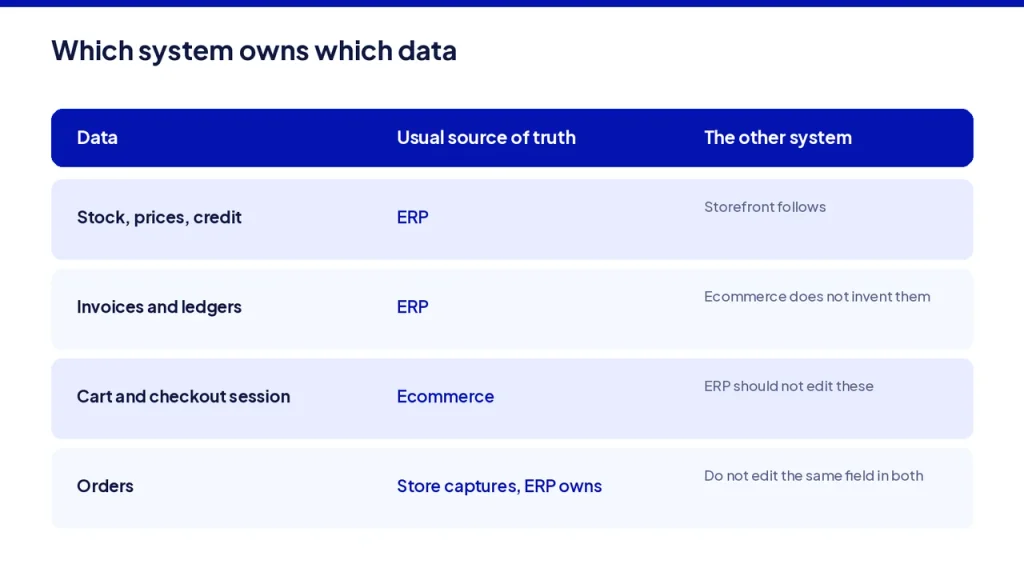
The most useful decision in any ecommerce ERP integration is ownership: for each type of data, one system is the source and the other follows. Two systems both allowed to edit the same field will eventually disagree. The table shows a common starting point. Your own answer depends on your ERP, your channels and how your teams work today.
| Data | Usual owner | Usual direction | Usual timing |
|---|---|---|---|
| Item master: codes, units of measure, tax codes, cost | ERP | ERP to store | On change or in batches |
| Product content: descriptions, images, categories | Store or a product information system | Stays in the store | Not synced to the ERP |
| Prices, price lists, customer price groups | ERP | ERP to store | Batches, plus a check at checkout for contract prices |
| Stock by warehouse | ERP or warehouse system | ERP to store | Near real time for fast movers |
| Customers, companies, credit limits, terms | ERP for accounts and credit; store for logins | Both ways, field by field | On change |
| Orders | Store creates; ERP processes | Store to ERP | As soon as placed |
| Order status, dispatch, tracking | ERP or warehouse system | ERP to store | On change |
| Invoices, payments, tax | ERP | ERP to store for viewing | On posting |
Products and catalogue content
Item codes, units, weights and tax codes usually belong to the ERP, because orders, invoices and stock depend on them. Descriptions, images and search attributes belong to the store or a product information tool. Splitting ownership by field, and not by record, stops an overnight import overwriting copy written that afternoon.
Prices, customer price groups and contract pricing
For most distributors the ERP is the price authority: list prices, customer price groups, customer-specific pricing and contract pricing live there because invoices are raised there. The ecommerce platform needs a copy fast enough to show each buyer their own price, and a way to confirm the price at checkout when a contract rule is complex. Units of measure matter here: a price per carton and a price per piece must resolve to the same figure on the order line and on the invoice.
Stock and multiple warehouses
Stock belongs wherever goods are received, reserved and picked, usually the ERP system or a warehouse system, which is where most businesses manage inventory. The store should show available stock, not stock on hand: on hand minus what is already reserved for open orders from every channel. With multiple warehouses, decide whether the ecommerce store shows a total, a figure per warehouse or a delivery promise by location.
Customers, companies and credit
Customer accounts, billing details, credit limits and payment terms usually belong to the ERP, because finance owns the risk and customer management sits there. Logins, passwords and buyer roles belong to the ecommerce platform. New companies that register online need a path into the ERP, often with an approval before they can buy on account. If the store keeps a copy of credit settings, record who changed them: Adobe Commerce lists a Reason for Change field for recording credit setting changes, as listed on 10 November 2026. Vendors model this differently: Microsoft Dynamics 365 Business Central, in its connector overview, describes matching B2B companies by tax or registration numbers, as listed on 10 November 2026. Customer data that flows both ways needs a rule per field: if a buyer changes a delivery address online, does that change the ERP record, or only that order?
Orders and order status
The store creates the order; the ERP processes it. After that, changes to lines happen in one place only, and the other system is told. Status, dispatch details and tracking numbers flow back so the buyer and customer service see the same picture.
Invoices, payments and tax
Invoices, credit notes and tax belong to the ERP or the accounting system. The store can show copies in the buyer’s account and pass card payments for the ERP to match. In countries with e-invoicing rules, the fields the tax authority expects are usually completed on the ERP side, so the order must reach it with accurate data.
One writer per field
Write the ownership decision down, field by field, before any build, and have the ERP partner and the finance lead sign it off.
Sync direction for each kind of data
Once ownership is clear, direction follows: data flows from the owner to the follower. The design work in any ERP integration is in the exceptions.
One way from the ERP
Items, prices, stock, order status and invoices usually flow one way, from the ERP platform to the store. If the store must change one, the change goes back to the ERP as a request.
One way into the ERP
Orders, new customer registrations and online payments flow from the store into the ERP. The ecommerce platform should send everything the ERP system needs to process the order without a phone call: customer account, price and unit per line, tax, delivery address, requested date and purchase order number.
Two-way data and its risks
Some records change on both sides, such as contact details. Two-way sync needs a rule for conflicts: which side wins, or who reviews the clash. Keep the list of two-way fields short; each is a place where two systems can overwrite each other.
Real time or batch: timing and trade-offs

Real-time sync sends a change as it happens; batch sync sends changes on a schedule. Real time costs more to build and loads the ERP more; batches cost less and are easier to rerun but leave a window where the two systems disagree.
What usually needs to be near real time
Stock for fast sellers, the order handoff into the ERP system, and credit checks for buyers near their limit. For example, in a hypothetical case, a distributor that syncs stock once an hour and sells 30 units an hour of a popular item could show up to 30 units that are no longer there by the end of each hour. Either the sync runs more often for that item, or the store checks the ERP at checkout.
What can run in batches
Catalogue changes, full price list updates and new product imports. An overnight batch suits prices that change monthly, if urgent changes can go out at once.
Load on the ERP and on-premise systems
An older on-premise ERP may not cope with a call from the store each time a buyer opens a product page. The usual answer is to keep a copy of ERP data in the commerce platform, refresh it on a schedule, and call the ERP live only at checkout. Ask your ERP partner what limits the ERP platform sets on API calls before deciding on the integration platform or method.
When a sync fails, where does the order go?
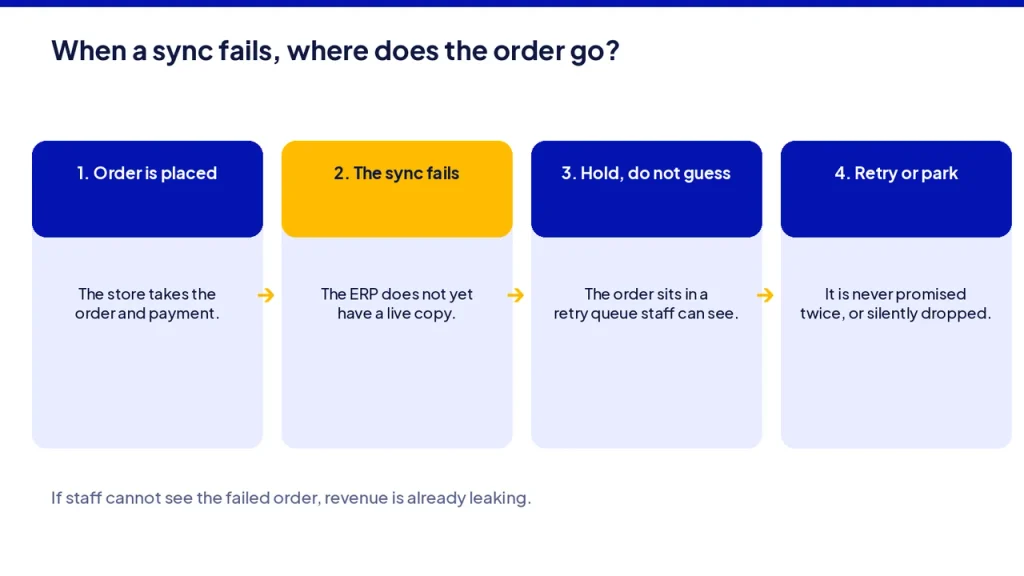
Every ERP integration fails sometimes: the ERP is down for maintenance, a call times out, or a new product code exists in the store but not yet in the ERP. What matters is where the order goes.
A queue that holds the order
A failed order should wait in a queue with its full details, not vanish or sit half-created in one system. The buyer still gets a confirmation.
Retries with a limit
Temporary errors clear on their own, so the ERP integration should retry a few times with a pause between attempts. After the limit, it stops and raises an alert, so the same faulty order is not sent repeatedly or created twice.
Alerts a person actually reads
Name the person who owns the exceptions list each day, explain what each error means, and give them a way to fix the data and resend without a developer.
A safety net for the sales team
If the integration stops for hours, reps need a way to keep taking orders and a rule for entering them later without duplicates. Agree that fallback before go-live.
ERP ecommerce integration methods: connector, middleware or custom
Ways of integrating ERP and ecommerce systems fall into three broad categories: a pre-built connector, a middleware or integration platform, and custom integrations built on the APIs of both. Each fits different business requirements.
Pre-built connectors
Many ERP and commerce platform vendors publish connectors for popular platform pairs, sometimes described as universal connectors. They are quickest to start and usually sold on a SaaS model, as a subscription. They fit when your data matches what the connector expects, and less well with price groups by unit of measure, warehouse rules or channels the connector does not cover.
Middleware and integration platforms
An integration platform sits in the middle as a hub: each system connects to the hub, and the hub maps and routes data between them. This suits businesses with many ecommerce systems and back-office tools, such as an ERP, a warehouse system, a store, online marketplaces and a CRM, because with multiple systems, adding one means one new connection to the hub, not one to each of the other systems. It adds another subscription and another place where data flows can break.
Custom builds through APIs
A custom build, point to point between two systems or as a small service of its own, gives full control over pricing rules, units of measure and failure handling. It costs more to build and someone must maintain it when either system changes. It fits when your rules are what makes your business different and no connector models them.
The engineering side of a custom integration is set out in a technical walkthrough of ERP sync for B2B commerce.
Comparing the three
| Method | Fits when | Watch for |
|---|---|---|
| Pre-built connector | Standard data, one store, one ERP, simple pricing | Rules the connector cannot model; limits on custom fields |
| Middleware or integration platform | Many systems and channels to connect | Another subscription; mappings that only one person understands |
| Custom build | Complex pricing, units, credit or routing rules | Build cost; who maintains it when the ERP is upgraded |
What vendors publish about their own connectors
Vendor documentation shows what a connector covers and what it leaves to you. Microsoft Dynamics 365 Business Central, in its connector overview, lists synchronisation of products, inventory, customers, orders, fulfilments, transactions and payouts with one hosted storefront platform, as listed on 10 November 2026. The same Microsoft page for Microsoft Dynamics 365 Business Central says the sync can run through the job queue, with logging for troubleshooting, as listed on 10 November 2026. Microsoft Dynamics 365 Business Central also describes, on that overview page, using selected customer price groups and discounts to define the prices it exports, as listed on 10 November 2026. Microsoft Dynamics documentation on importing orders describes filters, such as importing only fully paid orders, as listed on 10 November 2026.
On the ERP side, NetSuite describes in its connector business flow syncs that pull and push data at defined intervals, with orders exported into NetSuite and fulfilment data sent back to the storefront, as listed on 10 November 2026. Its go-live checks ask that tax totals, order totals, line items and quantities match between NetSuite and the cart, and suggest flagging 100 items first, then 1,000, before syncing the rest, as listed on 10 November 2026.
On the store side, Adobe Commerce describes company credit settings per company profile, including a credit limit and whether the company may exceed it, as listed on 10 November 2026. Adobe Commerce also documents shared catalogues with custom pricing for different companies, as listed on 10 November 2026. Adobe Commerce developer documentation on the shared catalogue module says a company can be assigned only one shared catalogue, as listed on 10 November 2026. If credit limits and company prices live in the ERP, an Adobe Commerce store holding its own credit settings needs them kept in step: the ownership question again. These are examples of what vendors document, not recommendations; any of them, or none, may suit your existing ERP.
Integration challenges to plan for
The technical connection is rarely the hard part. The integration process gets difficult where the business has grown its own way of working around disconnected systems, and those habits are business processes in their own right.
Legacy and on-premise ERP software
Older ERP software may offer only nightly file exports, or no test copy to build against. Find out early what it can accept and how fast.
Custom ERP fields and features
Years of customisation leave fields that mean something only to your team, such as a drop-ship flag or a price type for one key account. Each needs a decision: carry it, translate it or leave it.
Multiple data types and units of measure
Products sold by the piece, carton and pallet; customers with several delivery addresses and one billing account; orders that mix stocked items and made-to-order lines. The ecommerce integration must carry each data type without loss, and inaccurate data at this stage multiplies later.
Scaling with order volume and channels
A sync that copes with 50 orders a day may struggle with 500, and selling on multiple channels multiplies the places stock can be sold. Plan for the order volume and sales channels you expect in two or three years.
International sales, currencies and tax
Selling across borders adds currencies, tax rules and e-invoicing formats. Decide whether the ERP or the ecommerce systems convert currency and calculate tax. Your accountant and ERP partner own the tax treatment; the integration only has to carry their rules faithfully.
The role of your ERP partner
Your ERP partner configured the ERP and knows its limits and upgrade plans. An ecommerce and ERP integration project sits beside that relationship: the partner stays responsible for the ERP, and whoever builds the store owns their side and agrees the interface with the partner.
Many ERP vendors and partners offer an ordering portal; if it covers your channels, it may be all you need. When orders arrive from reps, a web store and marketplaces at once, some businesses build a commerce platform around the ERP, with the partner still owning the ERP. Either way, involve the partner from the planning stage.
Costs beyond licence fees
The total cost of ownership of an integrated ecommerce setup is more than licence fees. Over three years it usually includes subscriptions for the store, connector or integration platform; the build and data mapping; ERP partner time; hosting and monitoring; support when other systems are upgraded; and staff time on exceptions. Compare options on the same three-year view, against the cost of today’s manual work and errors.
Choosing by business size
A small business with one store and simple pricing often starts with a connector and accepts its limits. A distributor with multiple warehouses, customer price groups and several channels usually finds that ownership rules, units and failure handling drive the decision. The choice belongs to the business.
What must agree on go-live day of an ecommerce ERP integration
Switch-over is where an ERP integration proves itself or costs a day of lost orders. Plan it as its own stage of the integration process.
Before switch-over
- Item codes, units and tax codes match the ERP for every active product.
- Every online customer exists in the ERP system with the right price group, terms and credit limit.
- Test orders for each customer type, unit and tax case give the same totals in two systems.
- Store stock matches the ERP for a sample of items per warehouse.
- The exceptions queue and its owner are in place.
On the day
Freeze changes to prices and items for the switch-over window, run a final stock and price sync, then follow real orders through to the warehouse and the invoice. Keep the old ordering route open until the first orders have completed.
The first weeks after
Review the exceptions queue daily. Compare a sample of online orders with their invoices each week. Most problems now are data problems from before go-live; fix them at the source.
Frequently asked questions about ERP ecommerce integration
What is ERP ecommerce integration?
ERP ecommerce integration connects your ERP system and your online store so products, prices, stock, customer data, orders, invoices and tax move between them automatically. It removes manual entry and keeps both systems agreeing on the same, accurate information.
What is ecommerce revenue leakage?
Ecommerce revenue leakage is revenue lost to operational or system problems, not weak demand. Common causes are pricing errors, inaccurate stock, checkout failures, orders that never reach the ERP and delivery delays.
Why do pricing mistakes affect ecommerce revenue?
Pricing mistakes cut margin, confuse buyers and create correction work. In B2B they are riskier because customers have their own contract prices, discounts and payment terms, and a wrong price can carry through to the invoice.
How does inventory inaccuracy lead to lost sales?
Wrong stock causes overselling and cancellations on one side, and false out-of-stock messages on the other. The second kind is harder to see because the buyer leaves without a trace.
Which data should sync first in an ecommerce ERP integration?
Start where errors cost the most. For many distributors that is orders into the ERP and stock out of it, then customer prices; catalogue content can wait. Integrating ERP data in that order lets online sales start on accurate stock.
Does an ERP integration need to be real time?
Only for some data. Stock for fast sellers, the order handoff and credit checks benefit from near real-time sync; catalogue changes and price lists often run well in scheduled batches.
Do I need middleware for ERP integration?
Middleware helps when you connect several systems and channels. With one store, one ERP and standard data, a pre-built connector or a direct integration may be enough.
What happens to orders if the ERP is down?
A well-built ecommerce and ERP integration holds them in a queue, retries, and alerts a named person if they still fail. The buyer gets a confirmation and the order reaches the ERP once it is back.
Does integration replace my ERP partner?
The ERP partner keeps the ERP. The ecommerce and ERP integration connects to it, and the partner should be involved from the start because they know its fields, limits and upgrade plans.
When should a business consider ecommerce ERP integration?
Signs include growing manual work, inconsistent prices across multiple channels, unreliable stock, orders that need frequent correction and delivery delays that start to affect customer satisfaction.
Orders, prices and stock agreeing with the ERP
A Malaysian paint manufacturer has run its orders and stock on a system KVY built and has operated since January 2025. Its sales orders sync to QNE Cloud accounting with Malaysian e-invoice fields, customer price groups are resolved per item and per unit of measure, and stock reservations are kept as their own records, so the same stock is never promised twice. Those three points map to the ownership table above: prices, stock and invoices each have one home on a single system, and the others follow it.
If your orders come from reps, a web store and marketplaces at once, our wholesale ecommerce platform guide covers the ordering side, and our B2B ecommerce development work builds around your existing ERP while your ERP partner stays your ERP partner.
If you are weighing this for your own business, start with a plan. In two to three weeks we map how the system would connect to your ERP, warehouse, payments and sales channels, set out the build in phases with the cost to run it over three years, and give a fixed quote for the first phase. You keep the plan whatever you decide.