


Choosing a headless CMS often starts with a feature checklist. That is useful, but it misses the decision that matters most: how the CMS will fit your application architecture, deployment model, and team habits.
In a payload cms vs strapi comparison, both products cover the fundamentals as two strong cms options for teams trying to choose the right headless CMS. They are open source, self-hostable, API-first platforms with extensible admin experiences. The difference is where each CMS lives in your stack. Payload can run inside a Next.js application and exposes a Local API for server-side access. Strapi is typically deployed as a separate API service that any frontend can consume.
That architectural choice affects developer workflow, infrastructure, type safety, content operations, and long-term maintenance. This article compares the two platforms without pretending there is one universal winner.
Payload CMS vs Strapi headless CMS at a glance
Area | Payload CMS | Strapi |
|---|---|---|
Core architecture | Runs within a Next.js application | Runs as a standalone Node.js API service |
Modeling style | Code-first, TypeScript configuration | Visual Content-Type Builder plus project schema files |
API options | Local API, REST, and GraphQL | REST and GraphQL |
Official database adapters | PostgreSQL, MongoDB, and SQLite | PostgreSQL, MySQL, MariaDB, and SQLite |
Best fit | Next.js teams that value type safety and a unified codebase | Teams that want a frontend-neutral content service and visual modeling |
Hosting | Self-host anywhere Next.js runs; new Payload Cloud deployments are currently paused | Self-host or use Strapi Cloud |
The short answer to payload cms vs strapi is simple. Payload usually feels more natural when the CMS is part of a TypeScript and Next.js product. Strapi usually feels more natural when the CMS needs to serve several unrelated frontends or sit behind a clean service boundary.
Architecture differences
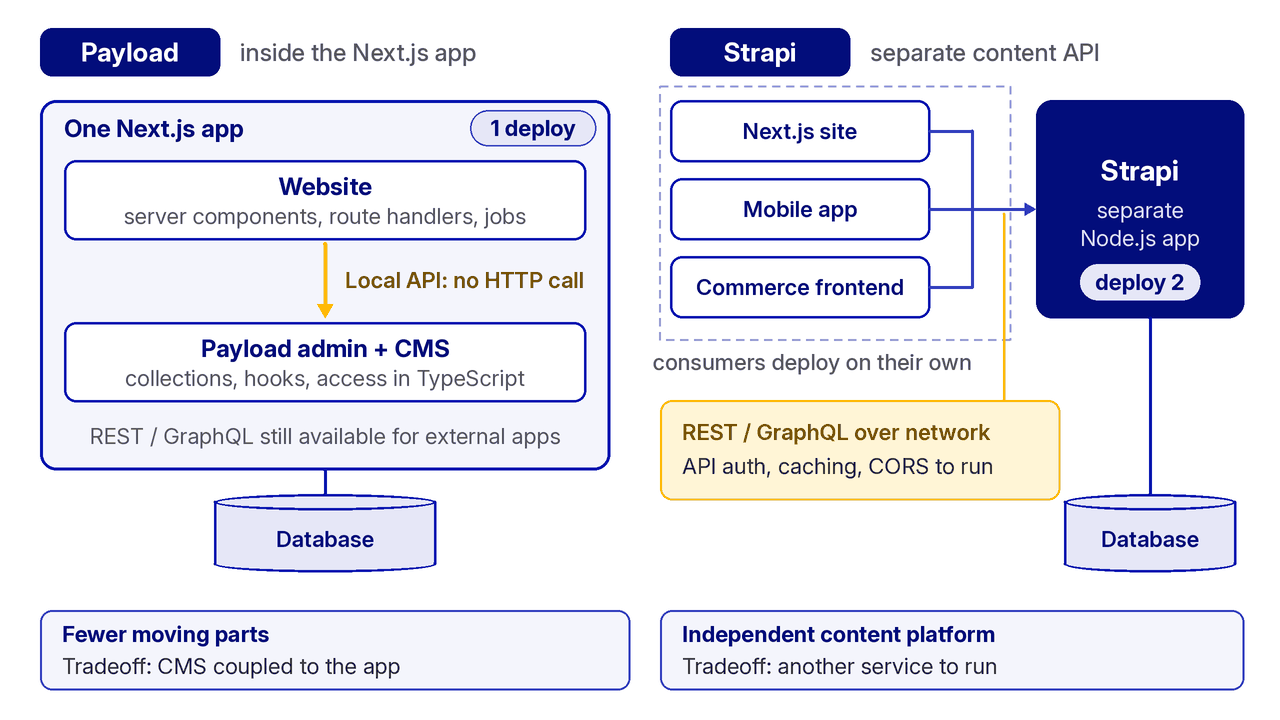
Payload lives inside the Next.js application
Payload 3.0 introduced a Next.js-native architecture. The admin panel and HTTP layer run in the same application, while collections, globals, access control, hooks, and other configuration live in TypeScript files.
The important feature is Payload’s Local API. Server components, route handlers, background jobs, and other trusted server-side code can perform CMS operations through direct database access inside trusted server-side code, without making an HTTP request to a separate service. That can improve front end performance by avoiding extra network hops, while REST and GraphQL remain available for external consumers.
This can reduce moving parts for a Next.js project. There is no cross-origin configuration between the website and CMS, shared types are easier to maintain, and one deployment can contain both the application and its content system. For teams focused on payload cms vs strapi, this is Payload’s most distinctive architectural advantage.
The tradeoff is coupling. If your organization wants the CMS to be an independent platform with its own release cycle, infrastructure boundary, and consumers written in several frameworks, an embedded architecture may not match that operating model, especially if teams need a CMS to wrap an existing database rather than use a code-first, app-owned setup.
Strapi is a dedicated content API
Strapi follows the more familiar headless CMS pattern. It runs as a separate Node.js application and serves content through a REST API or GraphQL. A Next.js site, mobile application, commerce frontend, or internal portal can consume the same content service.
That separation can be valuable. Frontend teams can change their rendering framework without relocating the CMS, and the content platform can have its own scaling rules and deployment cadence. A shared content service also makes integrations with other systems that consume the same API more straightforward. It is also a familiar shape for organizations that already manage multiple backend services.
The cost is another network and operational boundary. Teams must manage API authentication, user authentication, connectivity, caching, and cross-origin rules where applicable. Even when both services are on the same platform, they are still deployed and monitored as separate applications. That boundary is central to the payload cms vs strapi choice.
Content modeling and database support
Payload is code-first. Developers define collections and fields in TypeScript, commit those definitions to version control, and generate types from the configuration, which strengthens typescript support in day-to-day development. Schema changes therefore move through the same review and deployment process as application code. This is appealing when engineers own the content model and want changes to be explicit and reviewable.
Strapi offers a visual Content-Type Builder in its admin panel. It helps teams create collection types, single types, components, and relationships through a user interface. The resulting project files still belong in version control, but the modeling experience is more accessible to non developers and non technical users who do not want to begin in code. That admin ui and overall ui can also help teams manage content more comfortably.
Database requirements can be decisive in a payload cms vs strapi evaluation. Payload provides official adapters for PostgreSQL, MongoDB, and SQLite. Strapi supports PostgreSQL, MySQL, MariaDB, and SQLite, and some teams also weigh database choice by the flexibility of their queries. If your company has standardized on MySQL or MariaDB, Strapi has the clearer path. If document storage with MongoDB is important, Payload provides the official option.
Question | Favor Payload when… | Favor Strapi when… |
|---|---|---|
Who owns schema changes? | Developers manage models through TypeScript and code review | Editors or mixed teams benefit from visual modeling |
Which database is required? | PostgreSQL, MongoDB, or SQLite fits the platform | MySQL, MariaDB, PostgreSQL, or SQLite is required |
How should the CMS integrate? | Direct server-side access inside Next.js is useful | A standalone API boundary is a requirement |
Developer experience

Payload makes a strong case for teams already committed to Next.js and TypeScript, especially when they want deeper customization by sharing application logic and CMS logic in one codebase. The application and CMS can share utilities, validation logic, authentication context, and generated types. A developer can query content through the Local API and receive typed data without maintaining a separate client layer for every server-side operation.
Its hook and access-control systems also live in the same language and repository as the product. That makes advanced behavior and custom code for extending CMS behavior discoverable during code review. For a small product team, fewer repositories and deployments can translate into a simpler day-to-day workflow.
Strapi’s developer experience is built around a stable service boundary and an established admin workflow. Content types can be created visually, controllers and services can be customized, and a broad range of frontend technologies can consume the API. This structure is often easier to explain across independent teams because the contract is the API rather than a shared runtime, and content editors often benefit from that separation and workflow clarity.
Neither approach is automatically easier. A team that treats infrastructure separation as a virtue may find Strapi more predictable. A team that values end-to-end TypeScript and colocated logic may find Payload much faster. Test both workflows before treating payload cms vs strapi as a popularity contest.
Hosting, operations, and real cost
Both platforms use permissive open-source licenses, so there is no base license fee for self-hosting. That does not make either platform free to operate. Your actual payload cms vs strapi cost comparison must include compute, database hosting, object storage, email delivery, backups, monitoring, upgrades, and the engineering time required to keep the system healthy.
Payload can be self-hosted anywhere that supports a Next.js application and its chosen database. Its official cloud service currently allows existing projects to continue, but deployment of new projects is paused. A new project should therefore be planned around self-hosting or another supported host unless Payload announces a change.
Strapi can also be self-hosted, or teams can choose Strapi Cloud. At the time of this review, monthly cloud plans are listed at $35 for Starter, $90 for Pro, and $450 for Business. Prices and limits can change, so verify the current plan before budgeting.
Commercial features deserve a separate requirements review. Both vendors offer paid services or enterprise capabilities, and labels such as SSO, support, auditability, or publishing workflows do not map perfectly between products. Create a must-have list, confirm which edition supplies each item, and price the complete operating model for self-hosted or saas deployments, including third party integrations, rather than comparing license labels alone. That matters most for large enterprises with stricter governance and support requirements.
Ecosystem and product maturity

Strapi has a longer public history and a larger established ecosystem of plugins, and its plugin system can shorten implementation time when a maintained integration already covers your needs. Teams often look for ready-made extensions for seo, and broader ecosystem depth can also make hiring and troubleshooting easier because more teams have encountered similar patterns. Ecosystem depth is therefore a practical payload cms vs strapi criterion, not merely a vanity metric.
Payload’s ecosystem is younger, but its integration with the JavaScript and Next.js stack is unusually deep. Its public case studies include brands such as Mazda, Sonos, ASICS, and Vodafone. Payload joined Figma in 2025 and remains open source, giving the project a different strategic context without removing the need to evaluate roadmap fit.
Do not choose on GitHub stars or plugin counts alone. Those numbers change quickly and say little about the quality of the specific adapter, editor extension, authentication flow, deployment target, or custom plugins you need. Test the critical path in a short proof of concept.
Where Payload CMS wins
Payload is the stronger strapi alternative when most of the following are true:
- Your primary product is built with Next.js and TypeScript.
- You want the CMS, website, and server logic in one repository.
- Direct server-side content access would remove unnecessary API calls and improve performance.
- Developers are comfortable defining schemas and access rules in code, which can make Payload’s broader functionalities easier to shape in code-first projects.
- PostgreSQL, MongoDB, or SQLite meets your database requirements.
- You prefer a smaller deployment surface and accept tighter application coupling.
For these teams, the payload cms vs strapi decision is less about a missing feature and more about reducing architectural friction. Payload follows the shape of the application rather than asking the application to integrate with a separate CMS service. That advantage becomes clearer as more product logic stays inside the Next.js runtime, especially for teams that want strong customization without relying heavily on plugins.
Where Strapi wins

Strapi is usually the better choice when these conditions matter more:
- The CMS must serve several frontends built with different frameworks.
- You want a dedicated content service with an independent lifecycle.
- Content modeling should begin in a visual admin UI.
- MySQL or MariaDB support is required.
- A mature plugin ecosystem, including integrations, is important to your implementation plan.
- A managed vendor cloud is preferred for a new deployment today.
This is why Strapi still appears on many shortlists for the best open source headless cms. Strapi CMS is appealing when the CMS itself must stay frontend-neutral. Its service-oriented architecture is familiar, flexible, and deliberately independent from any single frontend framework, which is why it remains one of the best headless cms options for teams that want a separate service. In a multi-client payload cms vs strapi review, that independence can outweigh the convenience of a unified repository.
A practical decision framework
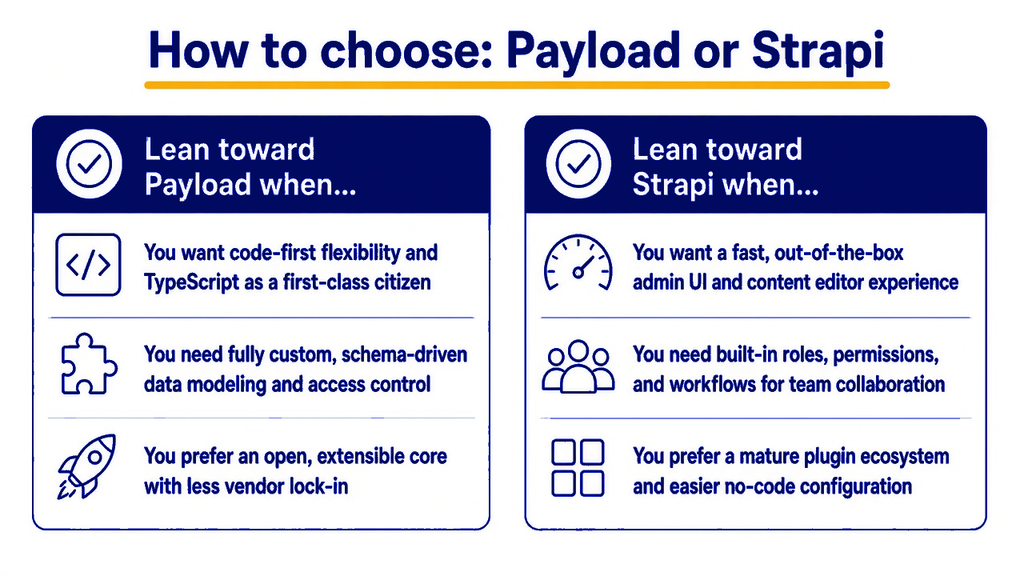
Before committing to payload cms vs strapi, run the same small project on both systems. Model one representative content type, add role-based access, upload media, create a preview flow, test content versions, and deploy the result. Include at least one migration and one integration that your production system will require.
Score the proof of concept against business constraints rather than demo polish:
- How many services must the team deploy and monitor?
- Can non-technical users manage content and complete common tasks without developer help?
- Are schema changes safe, reviewable, and repeatable?
- Does the platform support the required database and hosting region?
- For a medium-sized team, does operational simplicity matter as much as feature depth?
- How difficult is it to export content, verify plugins and integrations, or change direction later?
This exercise makes a payload cms vs strapi comparison concrete. It also exposes costs that a feature matrix hides, such as preview complexity, media handling, local development, and release coordination.
Final verdict
Choose Payload when you want a CMS that behaves like part of a modern Next.js application. Its Local API, TypeScript configuration, and unified deployment can make a developer-led product simpler to build and operate. This is the clearest Payload advantage in a payload cms vs strapi decision. For commerce builds, see how we pair Payload CMS with Medusa for content and catalog.
Choose Strapi when you want an independent content platform that can serve diverse clients, supports a broader set of relational databases, and gives teams a visual path into content modeling.
The honest conclusion to payload cms vs strapi is that architecture should decide the winner. Payload optimizes for deep integration. Strapi optimizes for separation. The better choice is the one that matches how your team already builds, deploys, and governs software. Revisit the payload cms vs strapi choice when those operating assumptions change.
If you are still weighing the tradeoffs, explore our Payload CMS development services. We can review your frontend, hosting, editorial workflow, and governance needs before recommending a platform.
Frequently asked questions
Is Payload CMS better than Strapi?
Payload is often better for a Next.js and TypeScript team that wants the CMS inside the application. Strapi is often better when the CMS must operate as an independent API for several clients, and Payload is not automatically better for non developers even when it suits that stack. The architecture and operating model matter more than a generic feature ranking.
Is Payload CMS open source?
Yes. Payload’s core is open source under the MIT license. You can self-host it and extend its TypeScript configuration, which also matters for teams comparing free tier expectations with commercial add-ons. Review any commercial hosting or enterprise requirements separately from the core license.
Is Strapi a good choice for multiple frontends?
Yes. Strapi’s standalone service model works well when websites, mobile apps, and internal tools need to consume one content API. Teams should also evaluate workflow needs like real time collaboration separately, along with authentication, caching, monitoring, and network boundaries between those clients and the CMS.
Which CMS is easier to host?
It depends on the stack. Payload can reduce the number of deployments in a Next.js project, but you still need a database, storage, backups, and monitoring. Strapi adds a separate application service, while Strapi Cloud can manage part of that operational burden.
What is the best way to compare Payload CMS and Strapi?
Build a small proof of concept with a realistic content model, permissions, media, preview, and deployment. Measure editor usability, developer effort, infrastructure complexity, and the cost of required commercial features before choosing.