


If you’ve researched building a marketplace on Medusa, you’ve probably read the official Marketplace Recipe, skimmed a tutorial series, and looked at Mercur, and still struggled to see the whole picture. That’s not you. The material is genuinely scattered: the recipe shows one approach, tutorials show another, starters embody a third, and none of them explain how the approaches differ or why you’d choose one.
This is the missing overview for Medusa.js multi-vendor builds. No code: the recipe and tutorials do that well already. Instead, this covers the three architecture patterns that exist today, the single axis that separates them, and the design decisions (order splitting, commissions, payouts) that determine whether your marketplace architecture survives contact with real vendors.
What “multi-vendor marketplace on Medusa” actually means
Medusa core ships no vendor concept: no vendor entity, no split orders, no commission engine. Medusa.js multi-vendor means adding a vendor layer to a modular commerce framework for a multivendor marketplace, where Medusa provides the core commerce foundation but not the vendor layer, making a marketplace with Medusa an architectural setup of extending core commerce with marketplace-specific logic: defining who vendors are (a custom module with the module’s data models while maintaining module isolation across different modules), what they can touch (custom actor types and scoped access for users alongside vendors, buyers, and admins), how a buyer’s cart becomes per-vendor orders (workflow-driven order splitting), and how money reaches sellers (commission logic plus a payout integration, typically Stripe Connect). Every existing solution (the official recipe, Mercur, community plugins) is a different set of answers to those same four questions.
The three architecture patterns (and the axis that separates them)
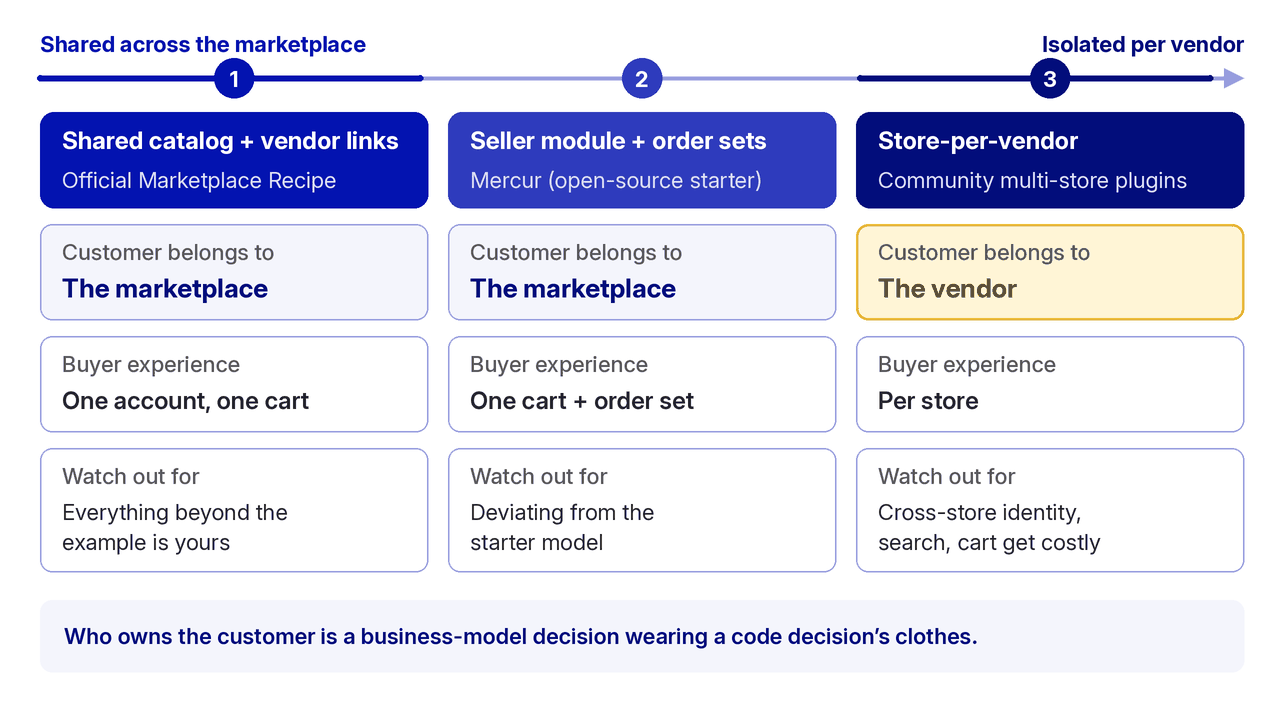
These are the main architecture options for a multivendor marketplace in a Medusa application. They differ on one axis: what is shared across the marketplace, what stays isolated per vendor, and—when data lives in different modules—how module isolation is preserved with links between them.
Pattern 1: Shared catalog + vendor links | Pattern 2: Seller module + order sets | Pattern 3: Store-per-vendor | |
|---|---|---|---|
Reference implementation | Official Marketplace Recipe | Mercur (open-source starter) | Community multi-store plugins |
Vendor representation | Marketplace module: Vendor + VendorAdmin models, with linked records connecting vendors to products and orders | Dedicated Seller module: products, team, stock locations, shipping per seller, often tied together through a module link | Each vendor is an isolated store (own catalog, orders, customers) |
Customer belongs to | The marketplace | The marketplace | The vendor |
Buyer experience | Unified: one account, one cart across vendors | Unified, production-hardened | Per-store; unified experience is extra work |
Order model | Cart split into per-vendor orders via workflows | Same, plus an order-set entity grouping orders from one cart for totals | Orders live inside each vendor’s store |
Best fit | Custom models; full control from a minimal base | Standard B2C marketplace; fastest credible production path | Vendor isolation as a feature: franchises, white-label networks, strict data separation |
Watch out for | Everything beyond the example is yours to design | Deviating far from the starter’s model erodes its head start | Cross-store buyer identity, unified search and cart get expensive |
The row that matters most is the one teams skip: who owns the customer. The final piece of the decision is still customer identity and data ownership, because that choice shapes the e-commerce model as much as the code. In patterns 1 and 2, a buyer belongs to the marketplace: one account, one cart spanning vendors, marketplace-wide personalization. In pattern 3, customers, orders, and catalogs live inside each vendor’s store; clean isolation, but a unified marketplace experience now swims upstream against the architecture. That’s not a code decision. It’s a business-model decision wearing a code decision’s clothes: make it consciously.
Vendor identity and access: actor types and the dashboard question

Medusa ships two actor types (customer and admin), but users are the broader identity layer around customers, admins, and vendor admins, and the official recipe’s approach to vendors is to add a third: a custom vendor-admin actor type with its own authentication, route scoping, and auth identity for vendor access control. Architecturally, that’s the right shape: vendors are neither customers nor platform admins, and modeling them as restricted admins (a tempting shortcut) leaks permissions in ways you’ll be patching for years.
The consequence everyone underestimates: Medusa Admin is for the platform operator, primarily the super admin. Vendor admins need somewhere to manage products, orders, earnings, and basic account access through a login page, and that interface is not in the box. Your options mirror the patterns above: build a vendor dashboard as a separate app (pattern 1, budget it as a real product, because it is one), inherit Mercur’s (pattern 2, a large share of the starter’s value), or lean on plugin-provided admin views (pattern 3). Whichever you choose, decide it at architecture time: the dashboard’s scope defines half your API surface in any Medusa.js multi-vendor build.
Order splitting: from one cart to many orders
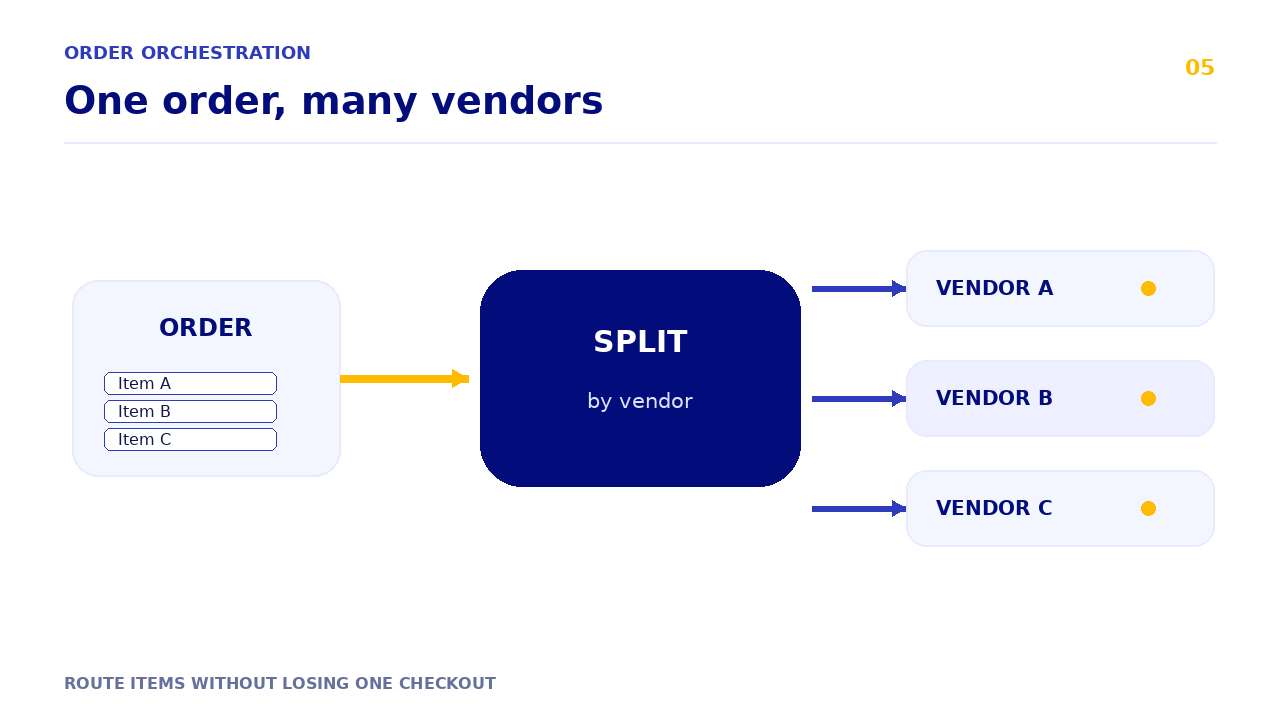
The defining transaction of a marketplace: a buyer checks out one cart containing three vendors’ products, and the system must produce three vendor-scoped orders, while the buyer still sees one purchase.
On Medusa, this runs through workflows: at checkout, route handlers or checkout logic may query vendor assignments before the split happens, then create a workflow for order splitting instead of relying on ad-hoc service calls. Inside that flow, each step function handles a discrete part of grouping items or creating vendor-scoped orders, atomically, with rollback if any step fails, which is precisely why the workflow engine is the right home for this logic. Pattern 2 adds one more entity worth stealing even if you build custom: a grouping record that ties the per-vendor orders back to the originating cart, so buyer-facing totals, receipts, and support views don’t require reassembling the split after the fact. Mercur calls this entity an OrderSet, and it’s a clean pattern for any Medusa.js multi-vendor project handling split carts. A route handler function or workflow hook can then return a new WorkflowResponse after creating the grouped records.
Design the split boundary early, because everything downstream inherits it: per-vendor fulfillment and shipping options, per-vendor returns, per-vendor tax lines, and the following steps in each vendor-specific flow. Teams that split late, or split only in reporting, end up reimplementing vendor boundaries in every feature that touches an order.
Commission and payouts: where the money logic lives

Two separate problems, routinely conflated.
Commission is order logic. The marketplace’s cut should be computed and recorded on the order at a defined moment, typically order creation or completion, with the rate that applied at that moment. Compute it lazily (“we’ll derive it at payout time from current settings”) and every rate change, promotion, or vendor-tier migration silently rewrites history. Workflows are again the natural home: commission calculation as a step in the order workflow, stored, auditable, and able to return a new StepResponse after persisting the computed value.
Payouts are money movement. Actually transferring a vendor’s share is a payments-infrastructure problem, and the standard answer is Stripe Connect (Mercur ships this pattern: automated payouts to sellers’ connected accounts). The architectural rule for any Medusa.js multi-vendor setup: payout execution should read from recorded commission data, resolve it from the workflow output rather than recompute it, and payout timing (on fulfillment, on delivery, after a return window) is a policy you’ll want configurable, because it will change. If you operate in a jurisdiction where holding vendor funds has regulatory implications, route money through the licensed provider rather than your own accounts and keep your platform outside the money flow. Medusa 2.0 also gives you the supporting payment features and tools through integrations to wire that infrastructure cleanly.
Five pitfalls that surface after launch
These compound the general trade-offs we’ve catalogued in Medusa’s disadvantages, but they’re specific enough to a Medusa.js multi-vendor build to call out on their own:
- Refunds across the split. A buyer refunds one item from a three-vendor purchase: one vendor’s order is partially refunded, their commission must claw back, the others untouched, and the buyer sees one coherent refund. Design refund workflows per vendor-order with grouped presentation, or support will run on spreadsheets.
- Shipping at the vendor boundary. Each vendor ships separately; buyers expect one shipping picture at checkout. Decide early how per-vendor shipping options compose into what the cart displays; it touches checkout UX, pricing, and vendor onboarding all at once.
- The dashboard that ate the budget. The vendor dashboard is a product: design, auth, permissions, support, and the customizations vendors will expect. Scope it at architecture time (see above), not after the backend “is done.”
- Reporting across the grouping. Finance thinks in marketplace totals; operations thinks in vendor orders. Without the grouping record from day one—and middleware to filter products and orders so vendors only see their own products—month-end reporting becomes archaeology.
- Vendor offboarding. Vendors leave. What happens to their products, open orders, pending payouts, historical data, and the database records behind them is an architecture question; answer it before the first vendor asks.
Planning your architecture and data models
The pattern comparison and the decisions above compress into a one-page planning pass: identify the key features the marketplace needs before implementation starts, pick your sharing axis, define the vendor actor and dashboard scope so you can add vendors cleanly, place the split boundary, fix the commission moment, choose payout rails and timing, and pre-answer the five pitfalls. Depending on those requirements, you may also need to customize Medusa. We’ve packaged exactly that as a checklist, the same one we run at the start of Medusa.js multi-vendor builds, and the following content can point you to that checklist or supporting material. Get in touch and we’ll send it over.
And if you’re still a step earlier, deciding whether Medusa is the right foundation at all, that’s a different article, and we’ve written it: Building a Marketplace with Medusa.js: What to Know Before You Start.
FAQ
How does order splitting work in a Medusa.js marketplace?
At checkout, API routes can trigger a workflow that groups the cart’s items by vendor and creates a separate order per vendor, atomically, with rollback on failure. Production implementations may also create links between the grouped order records and their source cart for later retrieval so buyer-facing totals and support views stay unified.
Does Medusa.js have a built-in vendor dashboard?
No. Medusa’s Admin serves the platform operator; vendor-facing dashboards must be built separately, inherited from a starter like Mercur, or provided by a plugin. It’s routinely the most underestimated component in Medusa.js multi-vendor budgets.
What’s the difference between the Medusa marketplace recipe and Mercur?
The recipe is a documented example that shows how to create the basic marketplace module and related API routes: a minimal marketplace module (vendors, vendor admins, linked products and orders, order splitting) you extend yourself. Mercur is a maintained open-source starter embodying a production-hardened version of that architecture, using module links to link products and other models while keeping boundaries clear: seller module, order sets, vendor dashboards, commission handling, and Stripe Connect payouts included, with more built-in features for multiple vendors.